



How to Set Up Your GitHub So It Works as Part of Your CV
GitHub can be just a place where you once uploaded a course project, forgot the password, and never came back. Or it can become part of your CV: living proof that you did not simply write “JavaScript / Python / Java / Go / SQL” in your CV, but can actually build projects, think through structure, organize code, and bring work to a clear result.
The difference between these two versions is often not about genius-level code. And not even about the number of projects. The difference is presentation.
When a recruiter or technical specialist opens your GitHub, they usually do not have three hours, a cup of tea, and the patience of an archaeologist digging through your early commits. They scan quickly: who you are, what you do, which projects you showcase, whether it is clear what is inside, whether there is a README, how to run the project, and whether it looks like intentional work or a storage room after moving house.
So the question is not simply how to make your GitHub look nice. The question is how to set up GitHub for your CV so that it works in your favor: strengthens the impression, explains your skills, and helps an employer understand faster why it is worth talking to you.
GitHub does not replace a CV. It should not turn into “everything is there, go look for yourself.” A CV explains your experience, skills, and direction. GitHub shows proof: projects, your approach to code, attention to detail, documentation, and interest in growth. When they are connected properly, they become a strong pair: your CV says what you can do, and GitHub shows what it looks like in practice.
Why include GitHub in your CV if you already have experience and skills?
A CV is a promise. GitHub is an example.
In a CV, you can write: “worked with REST APIs,” “built interfaces,” “used databases,” “wrote automated tests,” “set up deployment,” “developed pet projects.” All of this sounds fine, but for an employer the question remains: what exactly did that look like?
GitHub helps answer this question without long explanations. Especially if you have little commercial experience, are changing direction, are entering the job market after courses, or want to show that your skills are not limited to course assignments.
For a junior developer, GitHub often becomes almost a required part of the portfolio. Not because nobody gets hired without it. People do. But if two candidates have similar CVs, and one of them has well-presented projects with a README, demo, and clear description, that person is easier to evaluate. The employer does not have to guess what the candidate can do. They can see it in the work.
For a middle-level specialist, GitHub can also be useful, but in a different way. Here, it is not just about showing “I built an app.” It is about demonstrating maturity: project structure, clear decisions, documentation, tests, environment setup, and architecture. Even one or two well-presented projects can say more than ten random repositories.
GitHub as a portfolio is especially useful if:
- you are applying for jobs where practical skills matter;
- you have little commercial experience;
- your experience is under NDA and you cannot show work projects;
- you are moving from a related role into development;
- you want to confirm your tech stack;
- you are applying for remote or international roles;
- you want to stand out among similar candidates.
But there is an important point: GitHub only helps when it is understandable.
If the profile is empty, repositories are called test-1, new-final-final, lesson-homework, and the README consists of one line saying “my project,” that GitHub does not strengthen your CV. It may even create extra questions. Not critical ones, but unpleasant ones: can the candidate really present their work? Do they understand that a project should be understandable to other people? Do they finish what they start?
GitHub for a CV is not an exhibition of perfect code. It is a storefront. A storefront does not need to display the entire warehouse. It should show the best, clearest, and most neatly arranged items.
When GitHub really helps in a job search
GitHub does not always help. And that is normal.
If you have spent many years in commercial development, have a strong CV, clear experience, and recommendations, GitHub may be a nice addition, but not the main argument. But if you are an entry-level specialist, GitHub can become one of the key pieces of evidence that you can do more than pass tests — you can build working projects.
GitHub really helps when it has three things: clarity, relevance, and completion.
Clarity means that someone from the outside can open your profile and quickly understand who you are. They should not have to guess from a cat avatar, four empty repositories, and a mysterious description like “just coding.”
Relevance means that the projects are connected to the jobs you are applying for. If you want to work as a backend developer and your pinned projects are only landing page layouts from three years ago, the connection is weak. If you want to work in frontend and your GitHub has interfaces, API work, application state, responsive design, and deployment, that is already much better.
Completion means that the project looks like a result, not like a training session that stopped halfway through. It does not have to be huge. But it should have a description, structure, launch instructions, and at least a minimal explanation of what you did.
GitHub works well in a job search when it answers the employer’s questions:
- what this candidate can actually build;
- how carefully they present their work;
- whether they understand that other people will read the project;
- whether they can explain their decisions;
- whether they can bring a task to the point where it can be viewed;
- whether they have independent practice;
- whether they develop beyond the CV.
That is why you should not set up GitHub only “to make it pretty.” Beautiful badges, animations, and impressive cards can be nice, but they do not replace solid projects. An employer is not hiring a GIF of a contribution snake. Although the snake is cute, we will not argue with that.
A strong GitHub is when, within 2–3 minutes, it becomes clear: this is a person who can work with code, projects, and explaining their work.
What recruiters look at first on GitHub
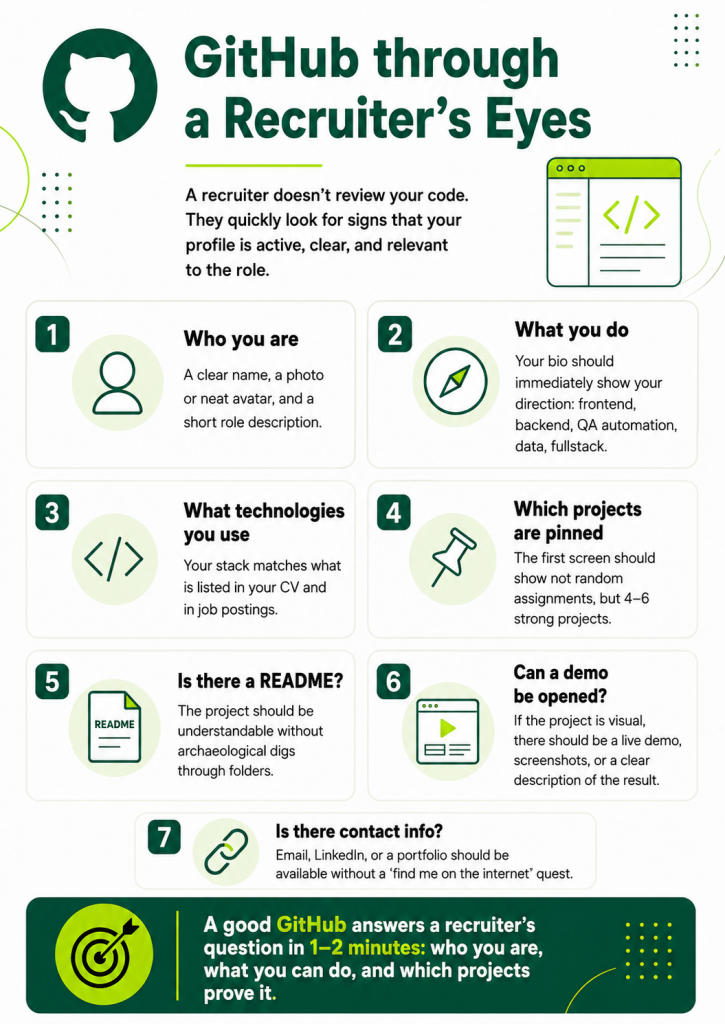
A recruiter usually does not conduct a technical code audit. Their task is to quickly understand whether the candidate is worth moving forward, whether the profile matches the vacancy, and whether there are signs of real practice.
Most often, recruiters do not look deeply. They look broadly.
First: the overall profile. Is there a name, a photo or clear avatar, a short description, contacts, links? If the profile looks abandoned, the impression is weaker. Not because the recruiter is obsessed with aesthetics, but because GitHub in your CV is presented as part of your professional image. If you gave the link yourself, it should help — not make someone think: “Is this definitely the right person?”
Second: pinned repositories. They work as your main storefront. A recruiter is unlikely to study all 47 repositories. They will look at what you pinned. So you should not pin random projects, but the ones that best show your skills for the role you want.
Third: project names and descriptions. A good name does not have to be creative. It has to be clear. task-manager-api, expense-tracker, booking-dashboard, weather-app, portfolio-site say more than project1, final, app, my-work.
The project description matters too. One line can help a lot: “Task management app with authentication, REST API and PostgreSQL” or “Dashboard for tracking marketing campaign metrics with charts and filters.” Even if the recruiter is not a technical specialist, they can understand: there is a task, functionality, and a stack.
Fourth: README. For a recruiter, a README is a translation from technical language into human language. If the README explains what the project does, who it is for, which technologies were used, where to view the demo, and how to run it, the profile immediately looks more professional.
Fifth: activity. Commits and contributions can be a plus, but they should not become a cult. The green activity calendar looks nice, but it does not replace project quality. It is better to have a few solid repositories than hundreds of commits called fix, fix2, final fix, really final fix.
A recruiter needs to see that GitHub did not end up in your CV by accident. If the link is there, it should lead to a place where the candidate looks like a specialist — not like someone who opened GitHub one night before a deadline.
What a technical interviewer looks at more deeply
A technical specialist looks differently. They may open the code, project structure, dependencies, commits, README, tests, error handling, architecture, and quality of decisions.
They are interested not only in “what was done,” but also in “how it was done.”
They may look at:
- whether the project structure is clear;
- whether the logic is separated;
- whether all the code is sitting in one giant file;
- how variables, functions, components, and modules are named;
- whether there is duplicated code;
- whether errors are handled;
- whether current approaches are used for the chosen stack;
- whether there are tests, linters, and formatting;
- whether it is clear how to run the project locally;
- whether there is an .env.example if the project requires environment variables;
- whether tokens, passwords, or unnecessary files got into the repository;
- how the candidate maintains the change history.
At the same time, a technical interviewer does not necessarily expect perfect code. Especially from a junior developer. But they do want to see thinking. GitHub shows very clearly how a person approaches a task: whether they simply force the project to “somehow work,” or whether they try to make it clear, maintainable, and explainable.
Projects where development is visible work very well. For example: first a basic version, then tests were added, then the structure was improved, then deployment appeared, then the README was updated. This shows that the person did not just upload an archive, but really worked on the project.
If you have open source contributions, pull requests, or issues, that is an additional plus. It does not have to be something huge. Even a small contribution to someone else’s project can show that you can read other people’s code, follow project rules, and communicate in a technical environment.
But there is no need to perform theater here either. Do not pretend that a course project is a product on the level of a major company. It is much better to honestly write: “Educational pet project for practicing authentication, API work, and deployment.” That is fine. Honesty plus neat presentation looks stronger than trying to inflate a simple project into “an innovative next-generation platform.”
How to set up your GitHub profile
A GitHub profile is the first page of your technical portfolio. If a CV is a business letter, a GitHub profile is the desk you invited a guest to look at. Ideally, it should not have chaos, cookie crumbs, and a folder called “sort out later,” but a clear system.
Start with the basics.
Photo, name, and short description
Use your real name or a professional version of your name that matches your CV. If your CV says Ivan Petrov and your GitHub says darkwolf777, the recruiter has to guess whether it is the same person. Your nickname can be anything, but the name in the profile should be recognizable.
The photo does not have to be studio-quality. But it should be neutral and clear. You can use a neat portrait, a minimalist avatar, or an illustration. The main thing is not to create the feeling of a random account.
In the bio, briefly write who you are and what you work with. There is no need to turn it into an autobiography.
Good options:
- Frontend Developer | React, TypeScript, REST API
- Backend Developer | Node.js, PostgreSQL, Docker
- Junior Software Developer focused on web applications
- QA Automation Engineer | JavaScript, Playwright, API testing
- Data Analyst | Python, SQL, dashboards
The bio should quickly answer the question: “What kind of specialist is this?”
Avoid writing something too abstract:
- I love code
- Future genius
- Learning everything
- Just another developer
- Coffee and bugs
The last one is relatable, but not very useful for an employer.
Location, contacts, and links
Add your city or country if it is relevant to your job search. You obviously do not need to include your exact address. A general location is enough.
Add a work email. Preferably a separate one that looks professional. If your email sounds like a memory from school, it is better to create a new one.
Add links to LinkedIn, a personal website, portfolio, or CV if you have them.
It is important that all links lead to current pages. A broken link in a profile is a small thing, but it creates a feeling of carelessness.
If you have a portfolio website or GitHub Pages, add it. Even a simple page with projects can strengthen your profile if it is neatly presented.
Profile README: what to write about yourself
A Profile README is a special README that appears directly on your profile’s main page. It is a great way to explain who you are, what you can do, and which projects are worth looking at.
But it is easy to overdo it. Some profiles turn into a Christmas tree: twenty badges, animations, stats, quotes, and somewhere between all that — the candidate.
Decoration is fine, but the meaning matters more.
A good Profile README should be short, clear, and useful.
The structure can look like this:
- who you are;
- which technologies you work with;
- which tasks interest you;
- which projects you are currently developing;
- which repositories are worth viewing;
- how to contact you.
Example:
Hi, I’m Alex
I’m a junior backend developer focused on building web applications with Node.js, Express and PostgreSQL.
I’m interested in API design, authentication, databases and clean project structure.
Featured projects
- Task Manager API — REST API with authentication, PostgreSQL and Docker
- Expense Tracker — web app for personal finance tracking
- Notes App — fullstack project with user accounts and CRUD features
Tech stack
JavaScript, Node.js, Express, PostgreSQL, Docker, Git
Contact
Email: example@email.com
LinkedIn: LinkedIn profile
This README does not try to become an encyclopedia. It helps the viewer quickly understand the profile.
You can add a small “Currently learning” block, but keep it reasonable. Do not list 25 technologies at once. If someone is “currently learning” Rust, Kubernetes, React Native, Machine Learning, Blockchain, and Japanese all at the same time, it does not look like growth — it looks like a fire in the brain.
Better:
Currently improving my skills in testing, Docker and backend architecture.
Which technologies to include
Include technologies you have actually worked with and can discuss in an interview. GitHub in a CV often triggers questions. If your README says Kubernetes, and the answer to “what did you do with it?” is silence, that will not help.
You can divide technologies into groups:
Languages: JavaScript, TypeScript, Python
Frontend: React, HTML, CSS
Backend: Node.js, Express
Database: PostgreSQL, MongoDB
Tools: Git, Docker, GitHub Actions
Testing: Jest, Playwright
Do not list everything you once opened. The stack should be supported by your projects. If your profile says Docker, ideally at least one project should actually have a Dockerfile or docker-compose. If you mention tests, it would be good to show tests in a repository.
Technologies in a profile are not decoration. They are a promise that GitHub should confirm.
How to choose repositories to pin
Pinned repositories are the most important part of your GitHub profile. They work like “featured items.” These are the projects you show to an employer first.
The main rule: 4–6 strong projects are better than 30 random ones.
Many repositories do not equal lots of experience. Sometimes the opposite is true: if everything is placed in the spotlight, it becomes harder to understand what really matters. An employer should not have to walk through your GitHub like a market and ask: “What is fresh here? What is good here? Where is my size?”
Choose projects that best show your skills for your target roles.
A good pinned project usually has:
- a clear name;
- a short description;
- a README;
- working code;
- launch instructions;
- a list of technologies;
- screenshots or a demo, where relevant;
- clear structure;
- up-to-date dependencies;
- no secret data;
- a sense of completion.
Why 4–6 strong projects are better than 30 random ones
Employers have little time. If you show everything, you are not helping them choose. A good candidate makes evaluation easier: they highlight the main things, structure information, and show what is relevant.
Four to six projects are enough to show different sides of your skills:
- one project involving interface work;
- one project with backend logic;
- one fullstack project;
- one project with a database;
- one project with tests;
- one project with deployment or automation.
You do not need to cover every category. What matters is that the set looks intentional.
If you are a frontend developer, pin projects that show components, API work, state management, forms, routing, responsive design, and deployment.
If you are a backend developer, show APIs, databases, authentication, queues, integrations, Docker, and tests.
If you are in QA automation, show automated tests, the structure of the test project, reports, API/UI testing, and clear launch instructions.
If you are in data, show notebooks, SQL queries, data processing, visualizations, task descriptions, and conclusions.
A developer’s GitHub portfolio should not be universal for everyone in the world. It should be useful for your goal.
Which projects are worth showing
Show projects where there is independent work and a clear task.
Good options include:
- a pet project that solves a specific problem;
- a course project that you improved independently;
- a copy of a well-known service, but with your own improvements;
- a tool for automating routine work;
- a project with an API and database;
- a project with authentication;
- a project with tests;
- a dashboard or analytics project;
- an open source contribution;
- a personal website or portfolio;
- a small library, CLI tool, or bot.
The project does not have to be revolutionary. Not every pet project has to change the market, the economy, and your grandmother’s life. The project should show skills.
For example, an ordinary task manager can be strong if it includes:
- registration and authentication;
- user roles;
- CRUD operations;
- filters and statuses;
- validation;
- tests;
- API documentation;
- deployment;
- a clear README.
And it can be weak if it is one file that “kind of works,” but nobody understands how.
Which projects are better to hide or not pin
You do not always need to delete old repositories. But you definitely should not pin everything.
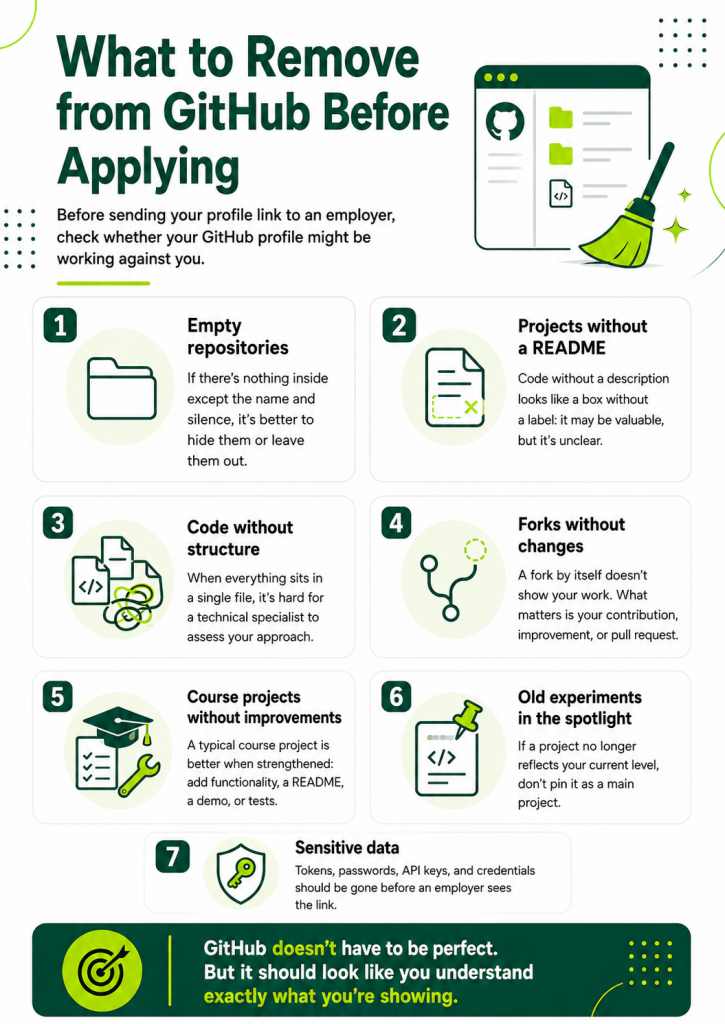
Do not pin:
- empty repositories;
- course assignments without improvements;
- projects named test, homework, copy;
- repositories without a README;
- broken projects;
- projects that cannot be launched;
- code with secret keys;
- old experiments that do not reflect your current level;
- someone else’s code without explaining what exactly you did;
- repositories with chaotic structure.
You can archive old projects or make private the ones you do not want to show. That is not deception. It is normal cleanup. In a CV, you also do not list every school club and every side job if they are not relevant to your goal.
Before a job search, GitHub should be cleaned up the same way you clean up your CV: remove what is unnecessary, highlight what matters, and update the descriptions.
How to write a project README
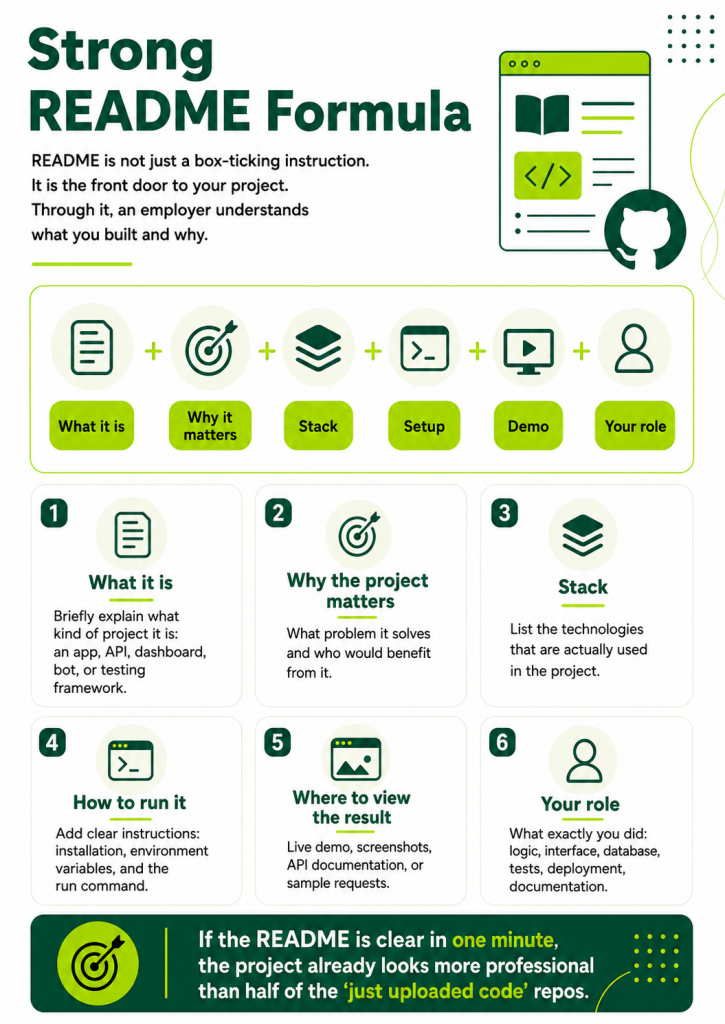
A project README is not a formality. It is the front door. Without a README, your project is like an apartment with no sign, no doorbell, and no light in the hallway. Maybe it is beautiful inside, but entering feels a little scary.
A good README answers simple questions:
- What is this project?
- Why does it exist?
- What can it do?
- What is it built with?
- How do you run it?
- Where can the demo be viewed?
- What exactly did you do?
- What could be improved next?
The README should be written not only for a developer, but also for someone evaluating you as a candidate. That means clear, structured, and without unnecessary heroics.
What the project does
Start with a short description. Explain the essence in 2–4 sentences.
Weak:
This is my project.
Better:
Task Manager API is a backend application for creating, updating and tracking tasks. It supports user authentication, project boards, task statuses and filtering.
If you are applying for international roles, it is better to write the README in English. It does not have to be complicated. The main thing is clarity.
Who it is for
This block helps show that the project was not just “written for the sake of code,” but solves a task.
For example:
The project is designed for small teams that need a simple way to organize tasks and track progress.
Or:
This project was created as an educational pet project to practice REST API development, authentication and working with PostgreSQL.
An honest description of the goal is a plus. Employers do not expect a junior developer to have built a commercial Jira competitor. But they will appreciate it if the candidate understands the purpose of their work.
Tech stack
List the technologies. There is no need to turn this section into an exhibition of logos.
Example:
Tech stack:
- JavaScript
- Node.js
- Express
- PostgreSQL
- JWT
- Docker
- Jest
If it is a frontend project:
- React
- TypeScript
- React Router
- REST API
- CSS Modules
- Vite
If it is a data project:
- Python
- Pandas
- SQL
- Matplotlib
- Jupyter Notebook
Important: include only what is actually used in the project.
How to run the project
This is one of the most important sections. Even if the employer does not run the project, the instructions themselves show attention to detail.
Example:
git clone repository-url
cd project-name
npm install
npm run dev
If environment variables are needed, add an .env.example and explain which values are required.
For example:
DATABASE_URL=
JWT_SECRET=
PORT=
Do not upload real tokens, passwords, API keys, or access credentials. That does not say “I know how to work with APIs.” It says “I probably should not be trusted with access yet.”
If the project runs through Docker, add a separate instruction:
docker-compose up –build
The easier the project is to launch, the better the impression.
Screenshots or demo
If the project is visual, add screenshots. If there is a live demo, add the link.
For frontend projects, dashboards, portfolios, and apps with an interface, this is especially important.
Screenshots help people understand the result quickly. Not everyone will clone the project locally. But almost everyone can open the README and see what the app looks like.
If the project is backend, you can add:
- examples of API requests;
- a link to documentation;
- a Postman collection;
- Swagger/OpenAPI;
- endpoint descriptions.
For example:
POST /auth/register — create a new user
POST /auth/login — authenticate user
GET /tasks — get user tasks
PATCH /tasks/:id — update task status
This section shows that you think not only about the code, but also about the user of your API.
What exactly you did
If the project was done in a team, make sure to specify your role. This matters. The employer needs to understand which part of the work belongs to you.
For example:
My responsibilities:
- designed database schema;
- implemented authentication;
- created REST API endpoints;
- added validation and error handling;
- wrote unit tests for task service;
- prepared Docker configuration.
If the project is individual, you can still list key decisions:
In this project, I focused on API structure, authentication flow, database relations and clear documentation.
This helps the technical interviewer ask relevant questions.
What can be improved next
A Future improvements block shows maturity. You acknowledge that the project can grow, and you understand how exactly.
Examples:
- add password reset;
- improve test coverage;
- add role-based permissions;
- add CI pipeline;
- optimize database queries;
- improve UI accessibility;
- add pagination and search.
This block should not sound like a list of things you did not do out of laziness. It shows the direction of development.
How to describe a pet project so it looks serious
A pet project is not a “toy project.” It is independent work through which you show skills. But for a pet project to look serious, it has to be presented properly.
The main mistake is describing it either too modestly or too pompously.
Too modest:
Simple app for practice.
Too pompous:
Innovative platform for transforming productivity and disrupting task management industry.
Better:
A task management web application built to practice fullstack development: authentication, CRUD operations, filtering, database relations and deployment.
This description is honest and professional.
To make a pet project look stronger, add context:
- what task you were solving;
- which technologies you used;
- what limitations you had;
- what you achieved;
- what you improved after the first version;
- which decisions you made independently.
For example:
I built this project to practice backend development with Node.js and PostgreSQL. The main focus was user authentication, database relationships, error handling and API documentation. After the first version, I added Docker configuration and improved the README to make the project easier to run locally.
This text shows not just the result, but the thought process.
A pet project works especially well when it resembles real tasks from job descriptions. You do not need to copy work products. It is enough to choose a topic with practical logic:
- a booking system;
- a task tracker;
- a mini CRM;
- a finance tracker;
- an analytics panel;
- a chat app;
- an online store;
- a notes service;
- an API for user management;
- report automation;
- a testing framework;
- an open data parser;
- a dashboard with filters.
The project should give you something to discuss in an interview. If you can explain why you chose a certain structure, how you handled errors, what was difficult, and what you would improve, that is already stronger than simply saying “here is the link.”
How to set up GitHub as a junior developer with no experience
For a junior developer, GitHub often becomes a bridge between “I studied” and “I am ready to work.” You may not have commercial experience yet, but practice should be visible.
It is important to understand: employers do not expect juniors to have perfect architecture or production-level projects. But they do expect signs of independence, care, and ability to learn.
A junior developer’s GitHub should show that:
- you know the basic technologies;
- you can build a complete project;
- you understand structure;
- you can describe your work;
- you are not afraid of documentation;
- you can fix and improve things;
- you did not just follow lessons, but tried to build something yourself.
If you only have course projects, improve them.
For example, say you had a course project: a to-do list. Add:
- authentication;
- filtering;
- database storage;
- responsive interface;
- tests;
- deployment;
- a proper README;
- a description of what you changed after the course.
Then the project stops looking like a copy of a lesson.
If you graduated from courses, do not pin every homework assignment. Choose the best ones and bring them to portfolio level. Employers can easily recognize typical course projects. There is nothing wrong with them, but you need to show what you added yourself.
A good wording:
This project started as a course assignment, but I redesigned the structure, added authentication, improved UI states and prepared deployment.
This is honest and shows initiative.
A junior without experience can set up GitHub like this:
- Profile README with a short description of their direction;
- 4–6 pinned projects;
- a proper README for every project;
- 1–2 projects with deployment;
- at least one project with tests or clear structure;
- current tech stack;
- link to CV or LinkedIn;
- no empty repositories in the spotlight.
Do not try to show “I know everything.” It is better to show that you work confidently with the basics. A junior who honestly shows clear projects looks better than a junior who lists 40 technologies and cannot explain half of them.
What to do if you do not have many projects
If you do not have many projects, there is no need to panic and urgently create ten identical apps over the weekend. It will be obvious. Better to do less, but better.
Start with one project and present it well. One strong project can work better than five weak ones.
Choose a task that shows several skills at once. For example:
- a fullstack application with authentication;
- a backend API with a database;
- a frontend dashboard with filters and charts;
- automated tests for a demo application;
- a tool for automating a simple task.
Then add to the project:
- README;
- launch instructions;
- tech stack description;
- screenshots;
- demo;
- tests;
- improvement plan.
After that, you can create a second project that shows another skill. For example, if the first one was frontend, make the second one a backend API. If the first one was educational, make the second one independent.
If time is limited, do not build a big project. Build a small but finished one. An employer is more likely to appreciate a neat mini-project than a grand unfinished platform where half the buttons lead into a philosophical void.
You can also improve existing projects:
- rename repositories;
- update README files;
- add .env.example;
- remove unnecessary files;
- add descriptions;
- split code into modules;
- add screenshots;
- fix launch instructions;
- pin the best projects.
Sometimes GitHub becomes stronger not after new code, but after proper cleanup.
How to connect GitHub with your CV, LinkedIn, and portfolio
GitHub should be part of a wider system, not a separate island.
Ideally, you have a connected set of materials:
- CV;
- GitHub;
- LinkedIn;
- portfolio or personal website;
- cover letter;
- specific projects.
All of these elements should support each other.
In your CV, you write: “Developed a pet project for task management with authentication, REST API, and PostgreSQL.” Next to it, you add a link to the repository and, if available, a live demo.
In the GitHub project README, you explain in detail what was done, how to run it, and which stack was used.
On LinkedIn, you can add the same project to Featured or Experience/Projects.
In your portfolio, you can add a project card with a screenshot, description, and links.
This way, the employer sees a coherent picture, not disconnected pages. You did not just add a GitHub link to your CV “because everyone does.” You built it into your professional presentation.
Project names should match. If the project in your CV is called Finance Tracker and the GitHub repository is called my-app-final, the connection gets lost. Rename the repository or at least add a clear description.
If you apply for different types of roles, you can adapt the project selection. For frontend roles, highlight projects with interfaces; for backend roles, APIs and databases; for QA automation, testing projects. You do not have to change your entire GitHub every time. But you can change the order and emphasis in your CV.
Where to place the GitHub link in your CV
It is best to place the GitHub link in the top section of your CV, next to your contact details. The same place where you include email, LinkedIn, portfolio, and city.
For example:
Email: name@email.com
LinkedIn: LinkedIn profile
GitHub: GitHub profile
Portfolio: portfolio website
If your GitHub is strong, the link should be visible. Do not hide it at the bottom after hobbies and the phrase “responsible, communicative.” Communication matters, of course, but the recruiter will need GitHub earlier.
You can also add links to specific projects in the “Projects” section.
Example:
Task Manager API
Backend application for task management: authentication, REST API, PostgreSQL, Docker.
Stack: Node.js, Express, PostgreSQL, JWT, Docker.
GitHub: link
Demo/API docs: link
This is especially useful for juniors and candidates without extensive commercial experience. The “Projects” section in the CV helps show practice, and GitHub gives the employer a way to check the details.
Do not add a GitHub link if the profile is not ready. It is better to spend a day or two presenting it properly than to send an employer a chaotic account. GitHub in your CV should strengthen the impression, not create extra decoding work.
Mistakes that stop GitHub from helping
GitHub can work against a candidate not because the code is bad, but because the profile was not prepared. These are the most common mistakes.
Empty profile
If your CV includes a GitHub link and there is nothing there, it looks strange. Better not to include the link until the profile is ready. An empty GitHub adds no information.
Random pinned repositories
Old course assignments, test folders, empty projects, and unclear experiments are pinned. The employer sees not your best work, but a random selection.
No README
A project without a README forces the viewer to figure out what is going on by themselves. Few people enjoy that. Especially during an initial review.
README exists, but explains nothing
The phrase “To start project run npm install” is not a README yet. You need to explain what the project does, which stack was used, how to run it, where the demo is, and what you did.
Unclear names
final-project, test, new-app, project2 do not help evaluation. The name should at least roughly explain the essence.
Secret data in the repository
Passwords, tokens, API keys, and database credentials are a serious mistake. Before publishing, check what got into the repository.
Broken launch instructions
If the README says one thing, but the project runs completely differently or does not run at all, the impression suffers. Check the instructions on a fresh setup.
Too many unfinished projects
Unfinished projects are not a problem by themselves. The problem is when they are in the spotlight. It is better to hide or not pin what is not ready to be viewed.
Copies without independent improvements
Course projects can be shown. But if it is fully copied code from a lesson, it has little value. Add your own part: new functionality, improved structure, tests, deployment, documentation.
Too many decorations
Badges, stats, animations, activity charts — all of this can look nice. But if the projects are buried underneath, the profile starts to look like a CV where half the page is beautiful typography and the experience was forgotten.
Mismatch with the CV
The CV lists one stack, while GitHub shows another. Sometimes that is fine, especially if you are moving between technologies. But then explain it in the projects or profile. Otherwise, it creates confusion.
Very old projects with no updates
An old project can stay if it is good. But if your best pinned repository was last updated three years ago and looks outdated, it is worth adding something fresh or updating it.
How to clean up GitHub in one evening
If your GitHub currently looks like a digital attic, it is not a disaster. It can be improved quickly.
First, open your profile through a recruiter’s eyes. Not as the author who remembers where everything is, but as someone seeing it for the first time. Is it clear who you are? Is it obvious what you do? Are there projects worth opening?
Then clean it up.
Update your name, bio, contacts, and links. Remove what is unnecessary. Add a Profile README if you do not have one. Choose 4–6 projects to pin. Rename unclear repositories. Add short descriptions. Check the README in every important project.
Then open every pinned project and answer these questions:
- Is it clear what the project does?
- Is there a tech stack?
- Can it be launched?
- Are there demos or screenshots?
- Is it clear what the author did?
- Are there no secret data?
- Are the instructions up to date?
- Does the project look complete?
After that, check the GitHub link in your CV. It should lead directly to your profile. If your CV mentions specific projects, the links should lead to specific repositories, not make the employer search manually.
This alone will create a noticeable improvement. You do not need to turn GitHub into a perfect portfolio in one evening. It is enough to remove the chaos and show the main things.
Checklist: is your GitHub ready to send to an employer?
Before adding GitHub to your CV and sending applications, check the profile against this checklist.
Profile
- A clear name is listed.
- There is a neutral photo or neat avatar.
- The bio states your direction and main stack.
- Contacts are added.
- Links to LinkedIn, portfolio, or CV are added if they are current.
- The Profile README briefly explains who you are and which projects to view.
Repositories
- The 4–6 best projects are pinned.
- Project names are clear.
- Every pinned project has a description.
- There are no empty or random repositories in the spotlight.
- Course projects are improved and properly presented.
- Old weak projects are not pinned.
README
- Explains what the project does.
- Lists the tech stack.
- Has launch instructions.
- Has screenshots or a demo where relevant.
- States what exactly you did.
- Has a future improvements section.
- Instructions are up to date.
Code and security
- There are no tokens, passwords, or secret keys.
- There are no unnecessary files such as node_modules.
- The project runs according to the instructions.
- The project structure is clear.
- File and folder names do not look random.
- Commits are not only fix fix fix.
Connection with the CV
- The GitHub link is in the contact section.
- Projects from the CV match the projects on GitHub.
- Separate links are added for key projects.
- The stack in the CV is confirmed by projects.
- GitHub does not contradict your positioning.
If the answer to most points is “yes,” your GitHub can already work as part of your CV.
Frequently asked questions about GitHub in a CV
Should I include GitHub in my CV?
Yes, if the profile has projects that confirm your skills. GitHub is useful for a CV when it helps an employer see your practice. If the profile is empty or chaotic, it is better to clean it up first.
Do recruiters look at GitHub?
Yes, but usually quickly. A recruiter looks at the overall profile, pinned projects, stack, README, and neatness. A technical specialist may look deeper: code, structure, tests, commits, documentation, and approach to decisions.
What should I write in a GitHub Profile README?
Briefly write who you are, which technologies you work with, which tasks interest you, which projects are worth viewing, and how to contact you. A Profile README should help someone quickly understand your profile, not turn into a long autobiography.
Which projects should I pin on GitHub?
It is better to pin 4–6 projects that show your main skills. These can be pet projects, improved course projects, open source contributions, fullstack applications, APIs, automated tests, dashboards, or automation tools. The main things are clarity, completeness, and connection to the roles you are applying for.
What matters more: number of commits or project quality?
Project quality matters more. Regular activity can be a plus, but the green calendar does not replace clear code, good structure, and a proper README. A few strong projects are better than many random commits.
Does a junior developer need GitHub?
Yes, especially if there is little commercial experience. GitHub helps a junior developer show practice, independence, and the ability to bring a project to a result. But what matters is not the number of course assignments, but the quality of presentation and improvement.
Can I include course projects?
Yes, if they are presented well and improved. A course project should not look like a fully copied assignment. Add your own functionality, improve the structure, create a README, deploy it, add tests, or write documentation.
Should I delete old repositories?
Not necessarily. But weak, empty, or outdated repositories should not be pinned. Some can be archived or made private. The main storefront of your profile should show your current level.
Where should I place the GitHub link in my CV?
In the top section next to your contacts, LinkedIn, and portfolio. You can also add links to specific projects in the “Projects” section. If a project is important for the role, do not make the employer search for it manually.
How should I write a project README?
A README should explain what the project does, which technologies were used, how to run it, where to view the demo, which part of the work you completed, and what can be improved next. A good README makes the project understandable even to someone seeing it for the first time.
GitHub does not have to be perfect. It has to be clear.
Many job seekers put off organizing their GitHub because they are waiting for the moment when their code becomes perfect. Spoiler: that moment may never arrive. Developers have a complicated relationship with perfection. There is always a way to rewrite something better, cleaner, faster, and “now it will finally be good.” Then a new framework version comes out, and the cycle starts again.
GitHub does not have to show a perfect candidate. It should show a living specialist who can work, explain decisions, and bring projects to a clear state.
A good GitHub for a job search is not about impressive complexity. It is about clarity.
- Who are you?
- What can you do?
- Which projects prove it?
- How can they be viewed?
- How can they be launched?
- What exactly did you do?
- Why is this relevant to the role?
If your GitHub answers these questions, it starts working as part of your CV. Not instead of the CV, not instead of the interview, not instead of experience — but together with them.
A CV opens the door. GitHub helps show that behind that door there really are skills, practice, and a solid working approach. And that is much stronger than simply writing “GitHub” in the skills section.