

How to Ace an Online Interview: A Detailed Guide to Not Looking Like You Accidentally Wandered into Zoom
Online interviews stopped being a “temporary replacement for a normal interview” a long time ago. For many companies, they are now standard practice: faster, more convenient, cheaper, and a way to speak with candidates from different cities and countries. For job seekers, they also have obvious advantages: you do not need to cross the entire city, search for an office in a business center with three identical entrances, and pretend you did not break a sweat after taking the stairs because the elevator was busy.
But there is a catch. An online interview only seems easier than an in-office meeting at first glance. In reality, it requires just as much preparation, and sometimes even more. Along with the usual questions about experience, motivation, salary expectations, and “tell us about yourself,” new characters enter the story: the camera, microphone, internet connection, background, lighting, audio delay, the cat, the neighbor with a drill, and your own face in the little square that is impossible not to stare at.
In this article, we will break down how to handle an online interview so that the recruiter sees not just “a candidate wearing headphones,” but a calm, articulate, professional person they want to keep talking to. There will be a lot of practical advice: how to prepare for an online interview, what to check in advance, how to introduce yourself, what questions you may be asked, which online interview mistakes ruin the impression, and what to do after the conversation.
Why an Online Interview Is Not “Just a Call”
The biggest mistake many candidates make is treating an online interview like a regular video call. As if there is nothing to it: click the link, turn on the camera, talk. But an online interview is still a business meeting, just through a screen.
The difference is that in an office, part of the impression forms naturally. You walk in, shake hands, see the space, feel the atmosphere, react to the people around you. In an online format, almost all of that disappears. The recruiter only has your voice, your face, your answers, and the way you have arranged your presence on camera.
That is exactly why preparation for an online interview matters. It helps remove unnecessary distractions and leaves the focus where it should be: on you, your experience, your motivation, and your ability to communicate clearly.
An online interview does not only assess your professional skills. The employer also inevitably notices other things: whether you can stay organized, whether you can set up a working environment, how calmly you react to minor glitches, whether you can listen and answer to the point. This becomes especially important in interviews for remote roles. If someone cannot join Google Meet without fifteen minutes of panic, the hiring manager may start wondering how that person will work in a distributed team.
Yes, that sounds a little harsh. But the good news is that almost everything can be prepared in advance.
What You Need for an Online Interview
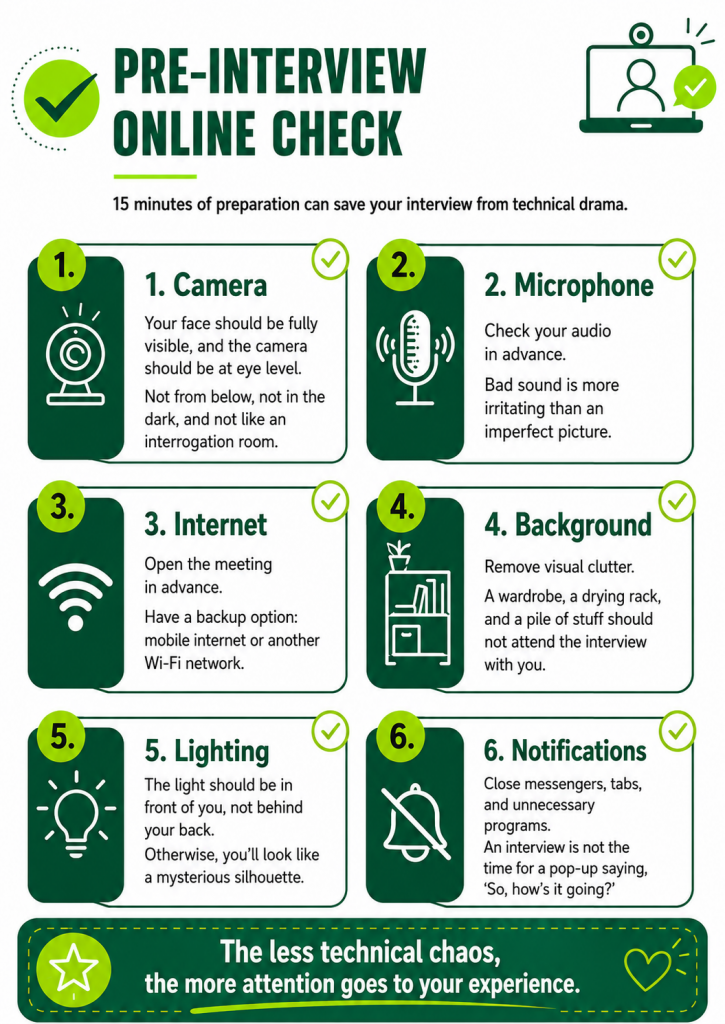
Let us start with the basics. Before thinking about what to say in an online interview, you need to make sure people can actually see and hear you properly. This is not a small detail. Even a strong candidate can sabotage themselves if the interview turns into a radio broadcast from a basement.
The minimum setup for an online interview looks like this: a stable internet connection, a working camera, a decent microphone, a quiet place, a neutral background, enough lighting, a charged laptop or phone, the meeting link, and a clear understanding of where the interview is taking place – Zoom, Google Meet, Microsoft Teams, or another platform.
It is better to take a video interview from a laptop or desktop computer. A phone is acceptable if there is no other option, but it is less convenient: it is harder to keep the frame steady, look into the camera, and open your CV, notes, or portfolio. If you do use a phone, place it on a stable surface. Holding it in your hand throughout the conversation is a bad idea. The image will shake, and you will look like someone giving an urgent live report from the scene.
Check your internet connection in advance. If your home Wi-Fi sometimes has a personality of its own, prepare a backup option: mobile data, another network, or the ability to reconnect quickly. Nobody expects a candidate to achieve technical perfection, but if the connection drops every two minutes, the conversation falls apart.
The camera should be at eye level or slightly above. If your laptop is too low, the recruiter will be looking up at you from below, which is not the most flattering angle. You can use books, a box, or a stand. The main thing is that the setup should not look as if it is about to collapse along with your confidence.
The microphone matters more than the camera. A bad image can still be tolerated, but bad sound gets tiring very quickly. If you have headphones with a microphone, use them. But make sure the sound is actually going through them, not through the laptop’s built-in microphone, which captures everything: you, the keyboard, the fridge, and your neighbors’ thoughts.
The background should be calm. You do not need to turn your room into a furniture catalog showroom. It is enough to remove visual chaos: piles of clothes, dishes, open closets, strange posters, and anything else that may distract. A neutral wall, a bookshelf, or a tidy workspace is ideal. Use virtual backgrounds carefully. Sometimes they “eat” your hair, hands, and half your face, making you look like a hologram with a weak internet connection.
Lighting is another important point. The light should fall on your face, not from behind you. If you sit with your back to a window, you will turn into a dark silhouette. It is better to sit facing the window or place a lamp in front of you. You do not need professional equipment. The simple goal is for the recruiter to see a real person, not a mysterious character from a crime series.
How to Prepare for an Online Interview in Advance
Preparation for an online interview does not start ten minutes before the meeting. Ten minutes before the meeting is usually when light panic begins: “Where is the link?”, “Why is Teams asking for an update?”, “The camera worked yesterday,” “Who took the charger?” It is better not to test fate’s sense of humor.
The day before the interview, open the invitation and check the time. Make sure you have understood the time zone correctly. This is especially important if the company or recruiter is in another country. The online format often creates the illusion that everyone is nearby, but the calendar may have other ideas.
Check the platform. If it is Zoom, Google Meet, or Microsoft Teams, open it in advance and see whether you need an app, whether the camera works, and whether your name appears correctly. Ideally, your profile name should look professional: first name and last name. “User_3847,” “BossBaby,” or an old school nickname is better left in the archives.
Prepare your CV. Open it before the interview, reread it, and remind yourself what exactly you wrote there. It sounds funny, but many candidates forget the details of their own CV, especially if they updated it in a hurry. The recruiter may ask about a specific project, period of work, or result. It is awkward when a candidate looks at their CV as if seeing it for the first time.
Study the job description. Do not just skim it. Highlight the key points: what the responsibilities are, what requirements are listed, which skills are repeated, and what the company expects from the person in this role. Your answers should connect to the vacancy. There is no need to tell your entire professional life story from your first part-time job to today if it does not help show your relevance.
Look into the company. You do not need to conduct an investigation on the level of “I know where you registered your domain.” It is enough to understand what the company does, what products or services it offers, who its clients are, and how it positions itself. This will help you answer thoughtfully and ask reasonable questions.
Prepare your self-introduction. The question “Tell us about yourself” is almost guaranteed to appear. It is better not to improvise from scratch. A good self-introduction in an online interview should be short, structured, and connected to the vacancy. Not a biography, not a confession, not a retelling of your CV, but a professional opening.
A good logic would be: who you are as a specialist, what experience you have, what tasks you have worked with, what results you can show, and why this role interests you. Ideally, it should take 1.5 to 2 minutes. That is enough to set the tone for the conversation without turning the beginning of the interview into an audiobook.
Prepare examples. Employers need not only nice words, but proof. If you say, “I work well in a team,” give a short example. If you say, “I can build processes,” show a situation where you did that. If you mention a result, add numbers, timelines, or a specific effect.
The numbers do not have to be huge. Not everyone’s work is measured in millions of users or a 300% revenue increase. Any clear indicators will work: reduced request processing time, improved response speed, launched a project on time, lowered the number of errors, helped the team close tasks faster, built a knowledge base, updated a process, or improved communication between departments.
Online Interview Checklist
Before the interview, it is useful to go through a short online interview checklist. This is not bureaucracy. It is a way to protect your nerves.
Twenty-four hours before the meeting, check the time, platform, and link. Reread the job description and your CV, and prepare a short self-introduction. Write down 3–5 examples from your experience that you want to use in your answers. Prepare questions for the employer. Check where you will sit, what will be visible on camera, and whether there is enough light.
One to two hours before the interview, charge your laptop, check the internet, camera, microphone, and headphones. Close unnecessary tabs and programs, especially anything that may send notifications. Clear your desktop of anything unnecessary. Prepare water. Open your CV, the vacancy, portfolio, or notes if you may need them.
Ten to fifteen minutes before the start, enter the platform or at least open the link. Make sure you can be seen and heard. Put your phone on silent. Let people at home know, if possible. Sit comfortably, but not too casually. Taking an online interview while half-lying down is, of course, bold, but it is better not to.
One minute before the start, take a simple breath in and out. Do not try to urgently reread the company’s entire biography. Everything that needed to be prepared has already been prepared. At this point, it is more important to enter the conversation calmly.
How to Behave During an Online Interview
Behavior in an online interview is a balance between being natural and keeping a professional format. You do not need to act like a robot with perfect posture, but you also should not turn the interview into a casual home chat.
Start with a normal greeting. Smile, say hello, and check whether you can be heard properly. This simple detail creates the feeling of a smooth start. For example: “Hello, nice to meet you. Could you please let me know if you can hear me clearly?” That is enough.
Do not look only at the screen; look into the camera too. Yes, it feels unnatural. You want to look at the other person’s face or at your own image. But if you never look into the camera, the other side may feel that you are avoiding contact. You do not need to stare into the lens without blinking. Just look at the camera from time to time, especially when answering important questions.
Do not interrupt. Video calls often have a slight delay, so it is better to pause briefly before answering. This looks calm and helps avoid speaking at the same time as the recruiter. If you interrupt by accident, it is fine: smile and say, “Sorry, please go ahead.”
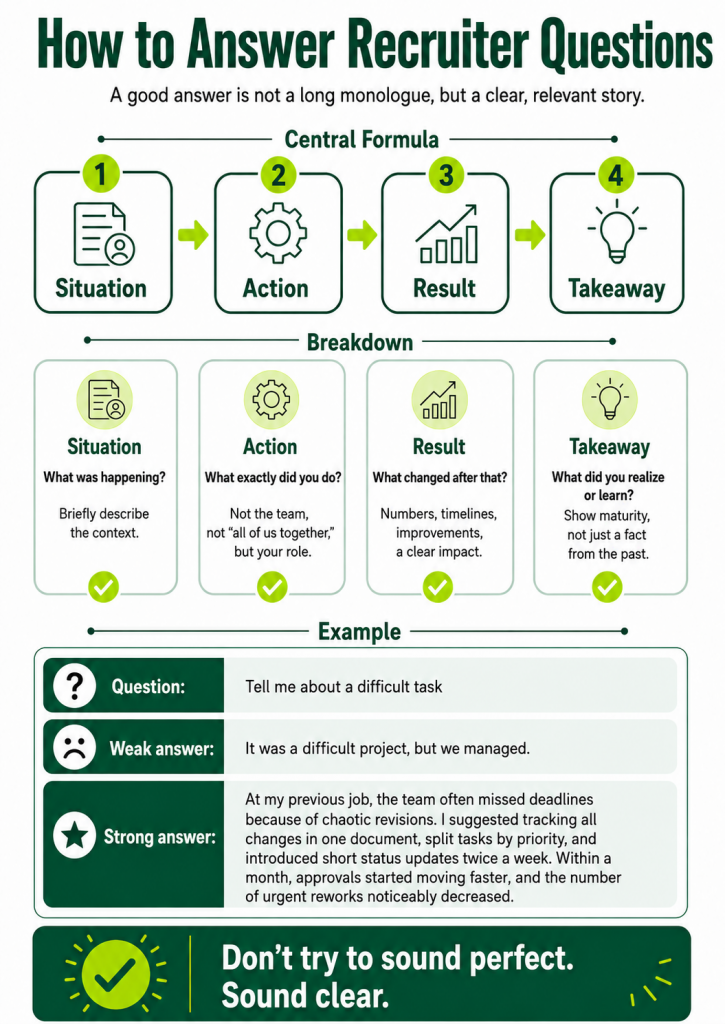
Answer to the point. The online format is less forgiving of long monologues. In the office, the other person can read emotions more easily, nod, and shift the rhythm of the conversation. In a video call, an overly long answer quickly becomes tiring. A good rule of thumb is to answer in a structured way: first a brief conclusion, then an example, then the result. If more detail is needed, the recruiter will ask.
Watch your speaking pace. When people are nervous, many start talking too fast. In an online format, this is especially noticeable: audio may lag slightly, words overlap, and part of the meaning gets lost. It is better to speak a little slower than in a regular conversation. Not theatrically slowly, just calmly.
Do not read your answers from a script. Notes are fine. A full text in front of you is risky. When a candidate reads a prewritten speech, it is visible immediately: the eyes move around, the intonation becomes wooden, and the live connection disappears. Use bullet points, not a screenplay.
Do not completely hide your hands if you naturally gesture while speaking. Moderate gestures help you sound natural. But do not wave your hands actively in front of the camera as if you are guiding a plane to land. Calm, contained energy works better on screen.
How to Introduce Yourself in an Online Interview
The question “Tell us about yourself” seems simple, but many candidates get stuck on it. Some start with university, some share too many personal details, some retell their CV point by point, and some say, “Well, I’m not even sure what to tell you.” The last option is especially sad, because the interview has only just begun and the candidate already sounds as if they have given up.
A self-introduction is not meant to impress with grand words. It is meant to quickly explain who you are, how you can be useful, and why this conversation makes sense.
A good structure looks like this:
“I am a specialist in [field], with [number] years of experience. I have mainly worked with [types of tasks]. My strongest area is [strength]. In my previous role, I achieved/improved/launched [result]. I am now interested in a role where I can apply this experience and grow in [direction].”
Example:
“I have been working with customer and operational processes for about four years. I have experience in user support, internal procedures, and service quality improvement. In my previous role, I helped reduce customer response time and created a knowledge base of common solutions for the team. I am interested in your vacancy because it combines communication, analytics, and process work, which is exactly where I can be useful.”
Another example:
“I have been working in marketing for about three years, mainly with content, email campaigns, and product promotion. In my previous project, I was responsible for launching email campaigns, preparing landing pages, and analyzing results. I like work where you do not just ‘make things look nice,’ but understand how they affect business metrics. That is why this role interests me.”
The main thing is not to try to sound perfect. People do not hire perfect texts. They hire specialists who can clearly explain their experience.
Online Interview Questions: What You May Be Asked
Online interview questions are generally similar to questions in a regular interview. The format changes, but the purpose remains the same: the employer wants to understand whether you fit the role, the team, the pace, the conditions, and the expectations.
Common online interview questions can be divided into several groups.
The first group is about experience. You may be asked what you did in your last role, what your main responsibilities were, which projects you consider most important, what tools you worked with, what results you can show, and why you left or want to leave.
Here, it is important to be specific. Not “I handled different tasks,” but “I managed client communication, prepared reports, coordinated tasks between teams, and updated instructions.” Not “I improved processes,” but “I created response templates, which helped new employees get up to speed faster.”
The second group is about motivation. Why are you interested in this vacancy? Why this company? What matters to you in a job? What do you want to develop? The employer is trying to understand whether you applied consciously or simply sent your CV to every opening in sight. Honesty matters here, but it needs to be framed professionally. The answer “I just need a job” is understandable on a human level, but weak in an interview. It is better to explain which tasks, format, product, or team attracted you.
The third group is about behavior in work situations. For example: tell us about a difficult conflict, a failure, a deadline, a situation where you had to learn quickly, dealing with a difficult client, or disagreeing with a manager. A good structure here is: situation, task, your actions, result, conclusion. There is no need to turn the answer into a 15-minute drama. The employer cares about your actions and maturity.
The fourth group is about soft skills: communication, independence, responsibility, teamwork, and the ability to accept feedback. Do not answer in generalities. Support your answers with examples.
The fifth group is about conditions. When are you ready to start? What are your salary expectations? What work format suits you? Are you ready to complete a test task? Are you in other hiring processes or do you have other offers? It is better to answer calmly and directly. Prepare your salary expectations in advance so you do not name a number with the expression of someone who has just frightened themselves.
How to Answer Questions Convincingly
A convincing answer is not always the prettiest answer. It is the answer after which the other person understands: this candidate knows what they are talking about.
When you are asked about achievements, do not be so modest that you disappear. Many candidates say, “Nothing special, I just worked.” But work almost always includes useful results. Your task is to see them and formulate them.
Weak: “I worked in customer support.”
Better: “I handled customer requests in chat and by email, helped solve technical and organizational issues. Over time, I started collecting recurring problems and suggesting updates to the knowledge base so the team could respond faster.”
Weak: “I made content.”
Better: “I prepared content for the website and social media, coordinated materials with the team, tracked publication deadlines, and analyzed which topics engaged the audience better.”
Weak: “I managed projects.”
Better: “I coordinated tasks between design, development, and marketing, monitored deadlines, collected status updates, and helped the team stay focused on priorities.”
If you are asked about weaknesses, do not use the old classic “I am too responsible” or “I am a perfectionist.” Recruiters have heard this so many times that somewhere in the world, a hiring manager gets sad every time it comes up.
It is better to choose a real but non-critical growth area and show that you are working on it. For example: “Earlier, I found it difficult to estimate timelines accurately. I often planned too optimistically. Now I break tasks into stages and account for approval time in advance, so my forecasts have become more realistic.”
If you are asked about a conflict, do not turn the answer into a story about how everyone around you was wrong. Even if they were. A good answer shows that you can not only defend your position, but also look for a solution.
If you are asked why you left your previous job, do not emotionally criticize your former employer. Even if it was a corporate circus with weekly acrobatic deadlines. Better to say calmly: “I realized I want more tasks in this direction,” “There became fewer growth opportunities in my current role,” or “The company’s priorities changed, and my tasks started to align less with where I want to develop.”
How to Pass an Online Interview for a Remote Job
An online interview for a remote job has its own specifics. The employer evaluates not only your experience, but also your readiness to work outside an office. Remote work requires independence, discipline, clear communication, and the ability not to vanish into the digital fog.
In an interview for a remote position, you may be asked how you organize your day, how you plan tasks, how you report progress, how you solve problems without constant supervision, and how you interact with the team in chats and calls.
It is good if you can show that you understand the specifics of remote work. For example: “I work well when tasks and priorities are clear. I usually document agreements in writing, clarify timeline expectations in advance, and provide short status updates so the team understands where I am with the task.”
If you already have remote work experience, definitely mention it. Not just “I worked remotely,” but exactly: which tools you used, what your schedule was, how communication was organized, how calls were held, how you received tasks, and how you delivered results.
If you have not worked fully remotely before, it is not a disaster. Be honest, but show readiness. For example: “I have not worked in a fully remote format before, but I have worked with distributed communication: some tasks were discussed online, statuses were tracked in a system, and documents were approved remotely. I understand that independence and transparency around tasks are important here, and I am ready to work this way.”
For remote work, questions to the employer are especially important. Ask how communication is organized, what regular meetings exist, how tasks are assigned, how results are measured, which time zone the team works in, and whether there is an onboarding period. This shows that you are thinking not only about whether you can work from home, but also about how to work effectively.
Online Interview Mistakes That Ruin the Impression
Online interview mistakes can be technical, behavioral, or content-related. Some seem minor, but together they create the impression of being unprepared.
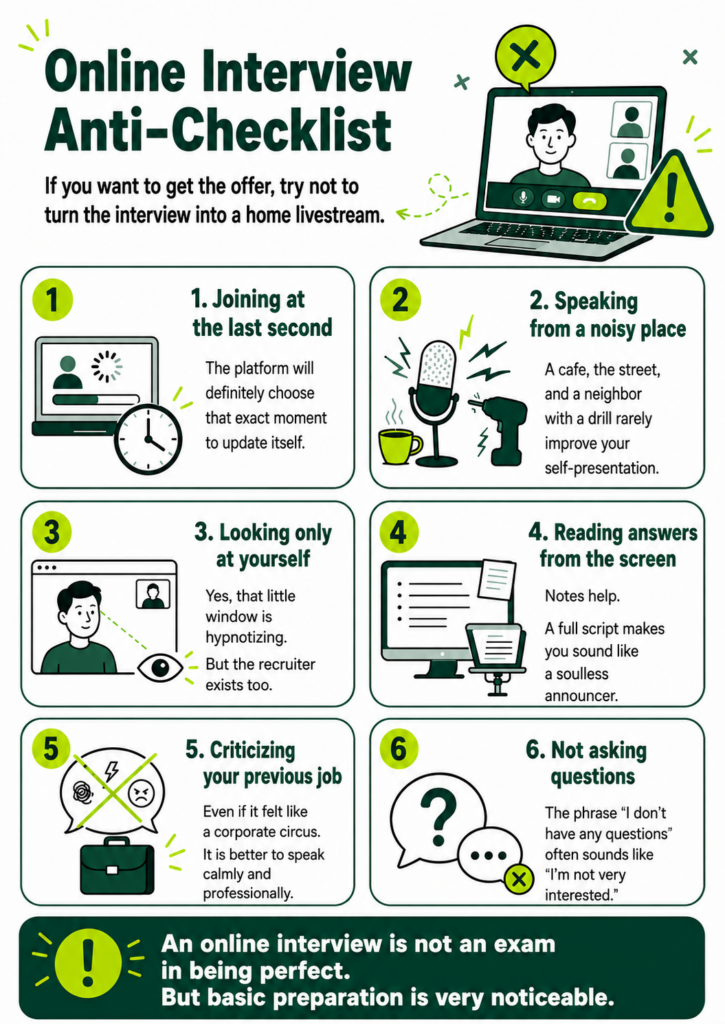
The first mistake is joining at the last second. If everything works, you got lucky. If not, chaos begins. It is better to be ready in advance. You do not need to enter the meeting room half an hour early, but it is worth opening the link and checking access.
The second mistake is not checking the sound. The phrase “Can you hear me now?” is not terrible by itself. It becomes terrible when it repeats every two minutes. Check your microphone and headphones before the interview.
The third mistake is a messy background. The recruiter should not be studying your drying rack, mug collection, or open closet. A candidate may be an excellent specialist, but visual clutter is distracting.
The fourth mistake is speaking from a noisy place. A café, shopping mall, street, car, or hallway are poor options for a serious interview. Sometimes circumstances are difficult, but if you can choose a quiet place, choose it.
The fifth mistake is looking only at yourself. Yes, the little square with your own face is hypnotic. But if you spend the entire conversation checking how your hair looks, it is noticeable. It may be better to hide self-view if it distracts you too much.
The sixth mistake is answering too long. The online format requires compactness. Do not turn every answer into a lecture. It is better to say less, but more clearly.
The seventh mistake is not knowing the vacancy. When a candidate asks, “Could you remind me what position this is?” It sounds bad. If you send many applications, make it a habit to save job descriptions or make brief notes.
The eighth mistake is criticizing previous employers. Even if the experience was unpleasant, an interview is not the place for an emotional postmortem. Show maturity.
The ninth mistake is not asking questions. When a candidate says at the end, “No, I have no questions,” it is not always bad, but it often looks like a lack of interest. Prepare at least a few questions in advance.
The tenth mistake disappears after the interview. A follow-up is not mandatory in every situation, but a short thank-you message can strengthen the impression, especially if the conversation was meaningful.
What Not to Do in an Online Interview
There are things that should be avoided completely. Do not take the interview lying down, in pajamas, with the TV on in the background, or while walking outside. Do not eat during the conversation. Water is fine. Lunch is not. Even if it is a very quiet salad, it will still join the interview uninvited.
Do not answer messages on your phone. If you are expecting an important call or there is an emergency, mention it in advance. Otherwise, it is better to put the phone away.
Do not open unrelated tabs. First, they distract you. Second, if you need to share your screen, you may accidentally show something unnecessary. Before the interview, close messengers, personal chats, meme tabs, and anything else that should not appear in a business conversation.
Do not use prompts too obviously. Sometimes candidates open prepared answers and read them from the screen. This does not look like preparation; it looks like an exam where you have been caught with cheat notes. Bullet points, yes. A full script, no.
Do not argue aggressively. An interview is a dialogue, not a battle to prove you are right. If you disagree with something, you can calmly clarify or explain your position. The ability to have a professional conversation is valued more than the desire to win every sentence.
Do not exaggerate your experience to the level of fantasy. The online format will not protect you from follow-up questions. If you said you managed a project, be ready to explain what exactly you did, who you worked with, what the timeline was, what problems appeared, and what results you achieved. It is better to describe your role honestly than to get tangled later.
How to Prepare Psychologically for a Video Interview
Feeling nervous before an interview is normal. Even experienced specialists get nervous. The problem is not the nerves themselves, but the fact that they can take control: disrupt your speech, speed up your pace, and make you forget obvious things.
The first way to reduce stress is to prepare a structure. When you have key points, examples, questions, and an understanding of the vacancy, your brain panics less. It thinks: “Okay, we have a plan. Not perfect, but survivable.”
The second way is rehearsal. Say your self-introduction out loud. Out loud, not in your head. In our heads, we all sound like confident experts with perfect diction. In reality, the first version sometimes comes out as: “Well, I, uh… worked… with tasks… different ones.” It is better to hear that in advance and fix it.
The third way is a test call. Ask a friend to join for five minutes or record yourself on camera. It may be uncomfortable, but it is useful. You will see how you sit, where you look, whether you speak too fast, and whether a shadow covers your face.
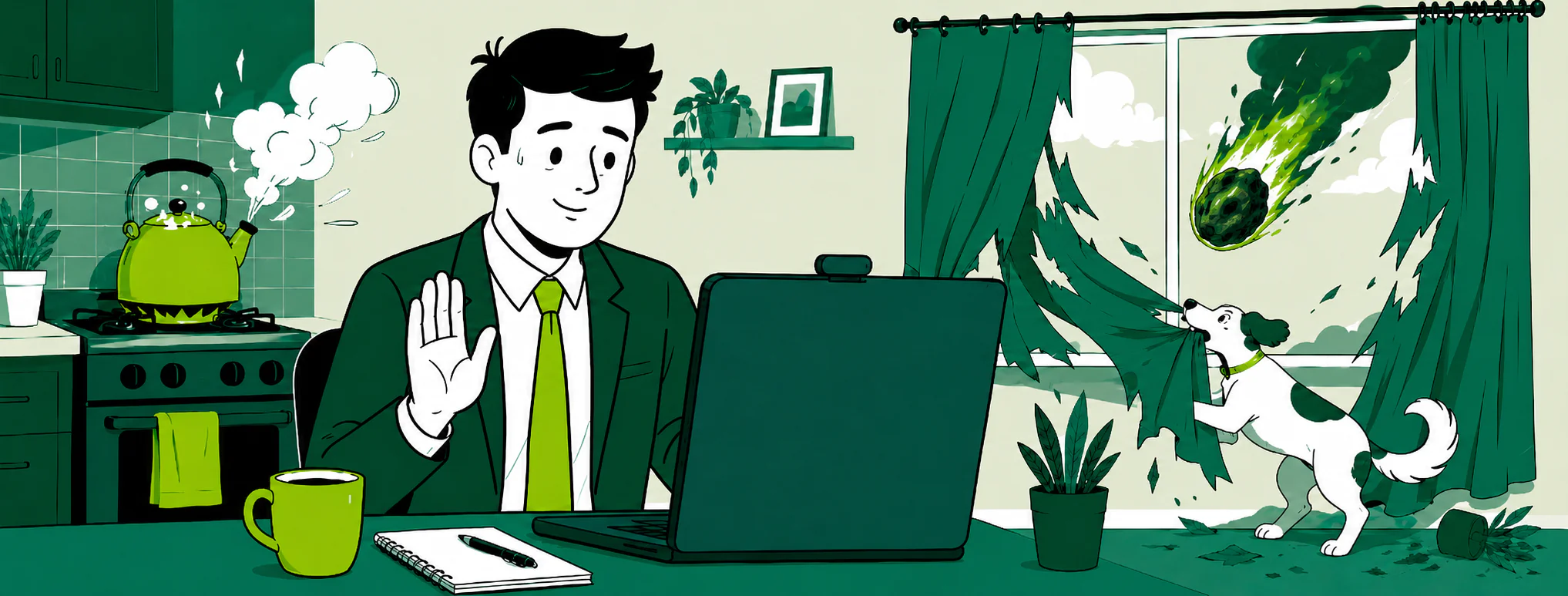
The fourth way is to normalize mistakes. An online interview does not require perfection. The connection may freeze, a dog may bark, a child, cat, or sudden courier may appear. What matters is not that something went wrong, but how you react to it. A calm “Sorry, one second, I’ll fix the sound now” looks much better than panic across half the screen.
The fifth way is to remember that an interview goes both ways. You are not the only one being chosen. You are also choosing. This is not an exam where a committee decides your fate. It is a meeting between two sides checking whether working together makes sense. That thought helps you stay calmer.
How to Answer When You Do Not Know the Answer
In an online interview, you may get a question you are not prepared for. That is normal. You do not need to fake confidence where you do not have it. It is better to answer honestly and in a structured way.
If the question is technical or professional, you can say: “I have not worked with this specific tool, but I have dealt with a similar task. I would approach it this way…” Then explain your logic. Employers often evaluate not only ready-made knowledge, but also the way you think.
If you do not remember an exact number, do not make one up. Say: “I cannot name the exact figure right now, but the approximate range was…” or “I can check after the meeting and send it over.” That is better than confidently naming a random number.
If the question is unclear, clarify it. Do not answer blindly. The phrase “Am I right in understanding what you are asking about…?” shows attentiveness, not weakness.
If you are asked to solve a case, do not stay silent for too long. Think out loud. Show your thought process: what data you need, what options there are, how you would test hypotheses, and what risks you see. Even if the final answer is not perfect, structured thinking works in your favor.
Questions to Ask the Employer in an Online Interview
At the end of an interview, you will almost always be asked: “Do you have any questions?” This is not the moment to say, “No, everything is clear,” if the only thing that is actually clear is that you want the offer.
Questions for the employer help you assess the vacancy and show your engagement. They should not be too formal. It is better to ask about things that genuinely affect the work.
You can ask: What will be the main tasks in the first two to three months? What does success look like in this role? Who will this person work with most often? How is onboarding organized? Why is the vacancy open? What are the team’s main challenges right now? How are decisions made? What does a typical workday look like? What tools are used? What is the next stage after this interview?
For remote work, it is worth asking how the team communicates during the day, whether there are regular calls, how tasks are documented, which time zones colleagues work in, how often synchronous availability is required, and whether a flexible schedule is possible.
Do not start only with questions about vacation, sick leave, and bonuses. These are important topics, but if your first five questions are all about when you can avoid working, the impression may be strange. It is better to discuss tasks and expectations first, then conditions.
Salary can and should be discussed, calmly. If the recruiter has not raised the topic, closer to the end you can ask: “Could you please tell me what budget is planned for this role?” or “My expectations are in this range. How does that align with your budget?” This is a normal business part of the conversation.
How to Talk About Salary Expectations
Money makes candidates especially tense. Some are afraid to name too much and lose the opportunity. Some name too little and then feel sad after the offer. Some answer, “Whatever you offer,” and hand all initiative to the employer.
Before the interview, research the market, your experience, the level of the role, and the conditions. Define a comfortable range: the minimum amount you are truly ready to accept, the desired amount, and the upper benchmark. In an interview, it is better to give a range, but not one that is too broad. “From 500 to 5000” is not a range. It is a cry for help.
A good formulation could be: “My expectations are around X–Y, depending on the tasks, work format, and full compensation package.” This leaves room for discussion but does not avoid the answer.
If the employer asks about your current salary, whether to answer is your choice. You can shift the conversation to expectations: “I would focus less on my current income and more on the responsibilities and level of the new role. My current expectations are…”
If you are offered less than you want, do not immediately agree out of fear. You can clarify: “Thank you, I understand. A comfortable level for me starts from X. Is there room to discuss this amount if we are aligned in terms of experience and responsibilities?” Negotiation is not arrogance. It is a normal part of hiring.
Portfolio, CV, and Test Task in an Online Interview
If your work is connected to projects, visual materials, writing, analytics, processes, or results, prepare a portfolio or examples in advance. Even if nobody asked for it. The online format is convenient because you can quickly share your screen or send a link in the chat.
But do not open your portfolio for the first time during the meeting. Check access. Make sure links work, files open, and there is no unnecessary private data. If you need to share your screen, close everything unrelated in advance.
Your CV should also be at hand. Sometimes the recruiter goes through it and asks questions. You should be able to quickly navigate dates, projects, and wording.
With a test task, it is important to clarify the conditions. Ask what scope is expected, how much time it should take, whether there will be feedback, how the result will be evaluated, and whether there is a deadline. These are normal questions. Especially if the task is large. A candidate has the right to understand what they are investing time into.
If the test task looks like a full work task that can immediately be used in the business, it is worth carefully clarifying the boundaries. Professional tone solves everything: do not accuse, ask.
How to Pass a Video Interview If You Have Little Experience
Having little experience is not a sentence. The problem begins when a candidate tries to hide it behind vague words. If you do not have much experience, focus on learning ability, practical tasks, projects, internships, freelance work, educational cases, volunteering, and personal initiatives.
You need to show not “I already know everything,” but “I have a foundation, I understand the task, I learn quickly, and I can be useful at my level.”
Be specific. If you completed a course, do not just name the course; explain what you actually did. If you had an educational project, describe your role. If you helped a friend’s business, made a website, content, a spreadsheet, analytics, support, or design, that is also experience if you can explain the task and the result.
Do not devalue yourself. Phrases like “Well, I’m just a beginner,” “I have almost nothing,” and “I probably don’t really fit” work against you. Better: “I currently have limited commercial experience, but I have already worked on these types of tasks and want to develop in this direction.”
For junior specialists, adequacy, motivation, attention to detail, and the ability to accept feedback are especially important. Sometimes an employer is ready to train someone if they see a solid working foundation and a healthy attitude.
How to Handle an Online Interview If You Have a Lot of Experience
Experienced candidates have a different problem: too much to talk about. You want to show the whole journey, all the projects, all the wins, all the painful moments, and all the difficult decisions. But an online interview is not infinitely stretchable.
Your task is to choose what is relevant. Do not tell your entire experience in order. Look at the vacancy and select examples that match it. If the role requires people management, talk more about the team, processes, and decisions. If expertise matters, talk about complex tasks, approaches, and results. If the role is cross-functional, talk about collaboration and influence.
An experienced candidate needs to show scale of thinking without arrogance. Not “I came in and saved everyone,” but “There was this situation, I suggested this approach, the team took these steps, and we achieved this result.” That sounds more mature.
You should also be ready for questions about motivation. The employer may think: why does someone with this experience want this role specifically? Will they get bored? Will they leave in three months? Prepare an honest explanation: interest in the product, a new market, the format, the team, the type of tasks, or the balance of responsibility and influence.
How to Deal with Technical Problems During the Interview
Even perfect preparation does not guarantee that everything will go smoothly. The internet may freeze. The camera may turn off. The platform may decide that right now is exactly when it needs an update. It is unpleasant, but not fatal.
If the sound disappears, write in the chat: “It seems my audio has dropped. I’ll reconnect now.” If the video freezes, calmly rejoin. If the problem is on your side and you need a couple of minutes, let them know. If the internet is unstable, suggest turning off video temporarily or switching to another communication channel.
The important thing is not to start over-explaining for too long. Briefly acknowledge the problem, suggest a solution, and continue. The employer is not only looking at the glitch itself, but also at your reaction. Calmness in a small unexpected situation is a good signal.
After a technical issue, you can say: “Thank you for waiting, sorry for the pause. I’ll continue from where I stopped.” Then move on.
Follow-Up After an Online Interview
After an interview, many candidates simply wait. Sometimes that is fine. But in some cases, a short follow-up helps reinforce a good impression. Especially if the conversation went well, the role is interesting to you, or you agreed to send something.
A thank-you email does not need to be long. It is enough to be polite: thank them for the meeting, mention your interest in the role, and, if needed, attach materials or clarifications.
Example:
“Hello! Thank you for today’s meeting. It was a pleasure to learn more about the team and the responsibilities of the role. After our conversation, my interest in the position has only grown. I’m attaching the portfolio we discussed during the interview. I would be glad to continue the conversation.”
If they promised to respond by a specific date, do not write the next day asking, “So what’s the update?” Wait until the stated date. If the deadline has passed, you can politely follow up: “Hello! I wanted to check whether there are any updates on the next steps. I remain very interested in the position.”
A follow-up shows professionalism, but it should not turn into a daily newsletter of anxiety. One polite message is fine. Five messages in two days is too much.
If You Get Rejected After the Interview
A rejection after an interview is unpleasant. Even if you are an adult and understand everything rationally, a small dramatic theater can still switch on inside: “That’s it, my career is over, I’ll go live in the forest.” No need to go to the forest. At least not because of one rejection.
A rejection does not always mean you are a bad specialist. They may have chosen a candidate with more relevant experience. They may have changed the vacancy. They may have frozen hiring. Another person’s salary expectations, availability, or task-specific background may have aligned better.
If possible, ask for feedback. Not all companies provide it, but sometimes you can get useful details. Phrase it calmly: “Thank you for your response. I would appreciate it if you could briefly share which points did not align after the interview. It would help me prepare better for future stages.”
If there is no feedback, do your own review. What went well? Where did you stumble? Which questions were difficult? Were there any technical problems? Did you speak for too long? Did you forget to ask questions? This kind of analysis helps improve the next interview.
Interviews are a skill. They develop with practice. Even strong specialists can perform poorly in interviews if they do not train. And the opposite is also true: a candidate with average experience can sound convincing if they understand their strengths and know how to present them.
A Mini Preparation Plan for the Day Before the Interview
The day before an online interview, you do not need to turn preparation into a marathon of anxiety. It is better to take a few concrete steps.
Reread the vacancy and highlight 5–7 key requirements. For each one, think of an example from your experience. Reread your CV and mark the places where you may be asked questions. Prepare a 1.5 to 2-minute self-introduction. Write down a few achievements or work situations that can support your skills. Prepare questions for the employer. Check your equipment and the place where you will take the call.
On the day of the interview, do not overload yourself. It is better to enter the conversation with a clear head than with twenty open tabs and the feeling that you are taking an international exam for the right to be an adult.
Full Checklist: How to Successfully Pass an Online Interview
Check the meeting link, platform, and time. Make sure you have accounted for the time zone correctly. Set up your camera, microphone, and headphones. Check your internet connection and a backup communication option. Prepare a calm background and good lighting. Charge your device. Close unnecessary programs and notifications. Open your CV, the vacancy, portfolio, and notes. Prepare your self-introduction. Recall examples of achievements and difficult situations. Prepare answers about motivation, experience, salary, and start date. Prepare questions for the employer. Join in advance. Speak calmly, structurally, and to the point. Look into the camera from time to time. Do not interrupt. Do not read answers from a script. After the interview, send a follow-up if appropriate.
Yes, the list is long. But after a few interviews, it becomes a habit. Like brushing your teeth, but for your career.
The Main Thing: An Online Interview Is Not a Performance, but a Normal Conversation
Many candidates think that to succeed in an online interview, they need to perform the ideal version of themselves. Confident, flawless, with perfect lighting, perfect answers, and the voice of a person who has never forgotten their Zoom password. In reality, no.
Employers do not need perfect characters. They need people who fit the tasks, communicate well, understand their experience, speak honestly about their abilities, and can work in a team.
An online interview is a chance to present yourself without unnecessary travel, waiting in a meeting room, or awkwardly searching for the water cooler. But it does require preparation: technical, professional, and psychological.
In short, if you want to pass an online interview and get an offer: prepare your equipment, study the vacancy, think through your self-introduction, speak specifically, ask questions, do not fear pauses, and stay human. Not a robot, not an actor, not the “perfect candidate from a textbook,” but a specialist who is clear, calm, and easy to communicate with.
And remember: even if one interview did not go perfectly, it is not the end of the story. It is practice. The next online interview can be better. And then even better. And then you will be the one explaining to your friends how to pass an online interview, why the camera should be at eye level, and why a cat in the frame is cute, but it is still better to get the offer for your experience, not your pet’s charisma.