



How to Tailor Your CV to a Specific Job in 30 Minutes
There are two types of job applications.
The first: someone opens a job board, sees a suitable vacancy, attaches the same CV they use for everything, clicks “apply,” and hopes that somewhere on the other side of the screen, the recruiter will somehow figure out how great they are.
The second: someone spends 30 minutes reviewing the job description, slightly adjusts their CV for the employer, strengthens the relevant experience, adds keywords from the vacancy, and sends an application that looks less like a random mass mailing and more like a proper response to a specific request.
Guess who has a better chance of getting invited to an interview.
Tailoring your CV to a job does not mean rewriting your entire career story from scratch every time, sighing dramatically, and opening a document called “CV_final_definitely_final_new_version7.” No. Good CV tailoring is a quick, precise adjustment of an already prepared document for a specific vacancy.
In this article, we’ll look at how to tailor your CV to a specific job in 30 minutes: what to change, where to find keywords, how to get through ATS, how to show relevant experience, what to do if your experience does not match 100%, and why one universal CV for every job is becoming less and less effective today.
Why One CV for Every Job No Longer Works
In the past, you could create one strong CV, send it to 50 vacancies, and wait for responses. Sometimes it even worked. Today, that approach increasingly turns into a game of “sent and disappeared.”
The reason is simple: employers are not just looking for a good specialist. They are looking for someone who fits a specific task, team, role, and set of requirements.
A recruiter does not read a CV like a literary critic reading a novel. They look at it as someone who has a list of questions:
- Does this candidate fit the vacancy?
- Do they have the required skills?
- Is their experience similar to what is described in the job posting?
- Do they understand the specifics of the role?
- Can this CV be forwarded to the hiring manager without long explanations?
If the job description says “experience with CRM, funnel analytics, and client communication,” and the candidate’s CV says something general like “worked with clients and completed department tasks,” the recruiter has to fill in the meaning themselves. And, as a rule, they have neither the time nor the desire to do that.
In 2026, CVs increasingly go through several filters. First, they may be reviewed by an ATS system or the employer’s internal database. Then by a recruiter. Then by a hiring manager. And at every stage, the document must quickly answer the main question: “Why is this person right for this role?”
A universal CV often answers a different question: “What has this person done at some point in their career?” That matters too, but it is not enough when applying for a specific job.
Tailoring your CV to a vacancy helps make the document more precise. You are not changing yourself to suit the employer. You are changing how you present your experience so the right parts of your background are immediately visible.
Imagine a wardrobe. It may contain everything: a business suit, a hoodie, a T-shirt with a cat on it, and the jacket you survived three moves in. But for an interview, you do not wear the whole wardrobe at once. You choose what fits the situation. A CV works in roughly the same way.
What It Means to Tailor a CV to a Job
Tailoring a CV to a job means aligning your CV with the employer’s requirements without distorting the facts.
This is important. Tailoring is not about “adding experience you never had.” It is not about “calling yourself a manager if the only thing you ever managed was a folder on your desktop.” And it is not about “stuffing every keyword from the vacancy into your CV until the ATS cries tears of joy.”
Proper CV tailoring includes several steps:
- identifying the key requirements in the vacancy;
- understanding which parts of your experience match them;
- rewriting wording so the matches are easier to notice;
- adding relevant key skills;
- removing or shortening anything that does not help this specific application;
- updating the “About Me” section for the role;
- checking the CV structure for both ATS and a real recruiter.
For example, you have project management experience, but in your CV it is described like this:
“Handled team tasks, communicated with contractors, prepared reports.”
And in the vacancy, the employer is looking for someone who will “coordinate tasks between teams, monitor deadlines, communicate with contractors, and prepare status reports.”
The tailored version could look like this:
“Coordinated tasks between the internal team and contractors, monitored deadlines, and prepared weekly status reports for the project manager.”
The facts are the same. But in the second version, the CV looks much more relevant to the job. The recruiter does not have to guess whether the experience fits. They can see it.
Good CV tailoring is not decoration. It is the translation of your experience into the language of the vacancy.
What to Prepare Before Tailoring Your CV
For CV tailoring in 30 minutes to actually take 30 minutes, and not turn into an archaeological dig through old documents, it is best to have a basic version of your CV ready in advance.
Ideally, you should have:
- a main CV with your full experience;
- a list of skills you genuinely have;
- several strong achievements with numbers;
- an understanding of the roles you are applying for;
- the saved text of the specific vacancy.
Your main CV is your base. It may contain more information than you need for each individual application. From it, you will select the most relevant parts.
For example, if you have worked in marketing, your base CV may include sections about content, analytics, advertising, communication, contractors, and reporting. For one job, analytics may matter most. For another, content. For a third, process management. All of these versions can be honest; the emphasis will simply be different.
Before preparing your CV for a job, open two documents side by side: the vacancy text and your CV. Do not try to tailor your CV from memory. At moments like this, memory likes to offer something vague, such as “well, they were probably looking for an active team player eager to grow.” What you need are specific requirements.
It is also useful to keep a list of your results nearby. Not just responsibilities, but actual outcomes:
- increased conversion;
- reduced request processing time;
- launched a process;
- improved reporting;
- trained new employees;
- closed a complex project;
- reduced the number of errors;
- sped up communication;
- helped the team meet a target.
Even if you do not have impressive numbers, you still have results. You just need to extract them from your experience and phrase them properly.
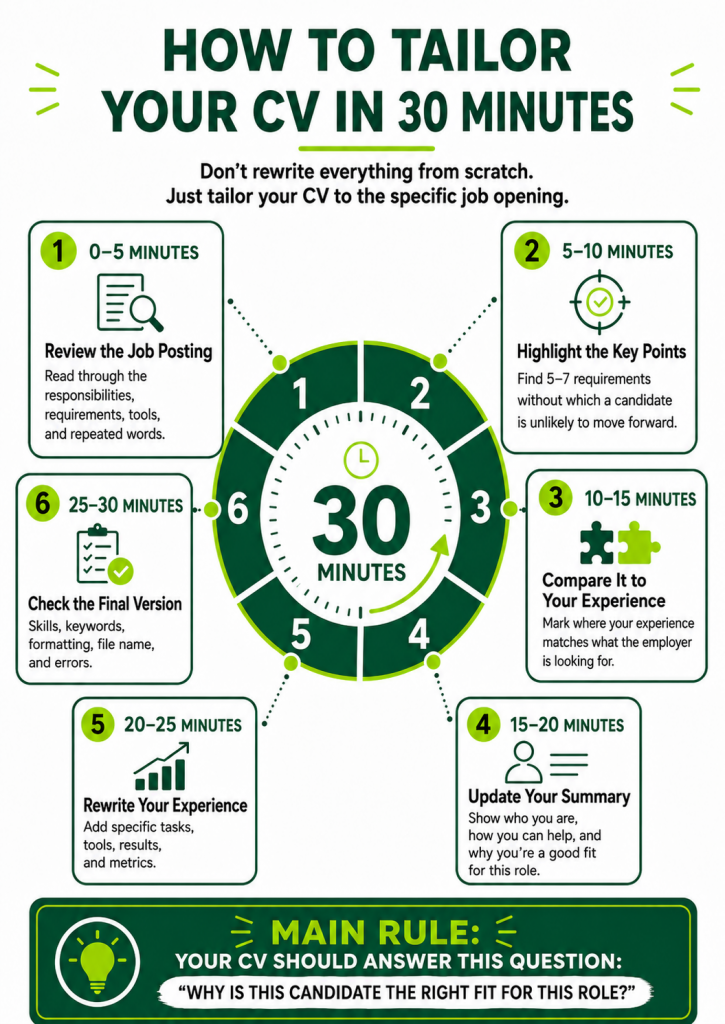
The 30-Minute Plan: How to Tailor Your CV Quickly
The biggest mistake candidates make is trying to tailor their CV chaotically. They open the document, look at the first section, move a comma, panic, close it. Then open it again. Then decide to change the font. An hour later, the CV is not any better, but they already feel as tired as after a quarterly report.
To avoid this, you need simple timing. Below is a practical plan for quickly tailoring your CV to a specific job in 30 minutes.
0–5 Minutes: Carefully Review the Job Description
For the first five minutes, do not touch your CV. At all. Even if your hands are itching to immediately replace “communicative” with “effectively interacting with people.”
Read the vacancy first.
Your task is to understand who the employer is looking for.
Pay attention to several parts:
- the job title;
- main responsibilities;
- mandatory requirements;
- desirable requirements;
- tools and software;
- expected results;
- work format;
- level of independence;
- words that repeat several times.
Often, the vacancy contains everything you need to tailor your CV. The employer is literally saying: “This is what matters to us.” You just need not to scroll past it like a user agreement.
For example, if the vacancy repeatedly mentions “analytics,” “reporting,” and “metrics,” then your CV should strengthen experience related to data, reports, insights, and performance indicators.
If the focus is on “independent project ownership,” “prioritisation,” and “working with multiple tasks,” then you need to show independence, process organisation, and the ability not to get lost when there are more tasks than browser tabs.
If the employer writes about “quick responses to client requests,” “quality of communication,” and “handling objections,” then client-facing experience becomes important.
Not all requirements are equally important. Usually, the top part of the vacancy and the first points in the responsibilities list matter more than the long tail of nice-to-have wishes at the end.
5–10 Minutes: Identify the Employer’s Key Requirements
Now you need to turn the vacancy text into a short list.
Write down 5–7 main requirements. Not 25. Not everything. Only the things without which a candidate will probably not pass the first CV screening.
For example:
- project coordination experience;
- working with CRM;
- performance analytics;
- client communication;
- report preparation;
- ability to handle several tasks at once;
- strong written communication.
Next to them, you can note the keywords from the vacancy. They will be useful for both ATS and a real recruiter.
Keywords in a CV are not magic spells. They are normal professional terms that help the employer recognise the required experience.
They can include:
- names of tools;
- names of processes;
- professional skills;
- types of tasks;
- work methods;
- reporting formats;
- markets or areas;
- levels of responsibility.
If the vacancy says “Google Analytics,” do not replace it with “web analytics systems” if you have genuinely worked with Google Analytics. It is better to use the exact name. If the vacancy says “Figma,” and your CV says “graphic editors,” the match becomes weaker.
But there is one important rule: keywords should only be included where they match your real experience.
ATS may notice resume keywords. But if it turns out during the interview that you added a tool just “for appearance,” the appearance will not last long.
10–15 Minutes: Compare the Vacancy With Your Experience
Now open your CV and compare it with the requirements you highlighted.
You can create a simple mini-table in your head or on paper:
- What does the employer need?
- Where does this exist in my experience?
- How is it currently written in my CV?
- Is it clear at first glance?
It often turns out that the experience is there, but hidden. For example, a candidate worked with reports, but wrote “completed administrative tasks.” Or managed contractors, but wrote “participated in projects.” Or analysed ad performance, but wrote “helped with marketing.”
A recruiter is not required to decode your experience. If the required skill is there, it needs to be shown.
At this stage, you do not need to rewrite the whole document. It is enough to mark the places that need strengthening:
- headline;
- “About Me” section;
- key skills;
- 2–4 points in work experience;
- achievements;
- tools;
- cover letter, if needed.
Good CV tailoring to employer requirements usually happens in targeted edits. You do not change everything; you change the most visible and important areas.
15–20 Minutes: Rewrite the “About Me” Section
The “About Me” section often looks as if it was written in an elevator between floors:
“Responsible, communicative, stress-resistant specialist, quick learner, looking to grow in a stable company.”
The problem is not that these qualities are bad. The problem is that they say almost nothing. They could be inserted into the CV of a manager, designer, HR specialist, administrator, astronaut, or someone who sells potted plants.
The “About Me” section should quickly explain who you are, what relevant experience you have, and why you fit the vacancy.
A weak version:
“I am looking for an interesting job where I can apply my skills and develop as a specialist.”
Better:
“Specialist with experience managing client projects, preparing reports, and coordinating tasks between teams and contractors. Worked with CRM, monitored task deadlines, and participated in improving client communication processes.”
If the vacancy is analytics-related, you can strengthen the analytics angle:
“Specialist with experience analysing performance indicators, preparing regular reports, and identifying growth opportunities in work processes. Able to work with data, structure information, and translate insights into clear tasks for the team.”
If the vacancy is more about communication:
“Specialist with experience in client communication, request processing, and supporting tasks through to completion. Able to quickly understand an issue, document agreements, and maintain clear communication with clients and the team.”
The formula is simple:
- who you are;
- what experience you have;
- what tasks you can handle;
- which skills are especially important for this vacancy.
The “About Me” section does not need to be long. Three to five lines are enough. It is not an autobiography; it is the front door to your CV. And ideally, that door should not say “I am a good person.” It should say: “I fit your task.”
20–25 Minutes: Adapt Experience and Achievements
The most important part of a CV is work experience. This is where the employer understands what you have done in practice.
When adapting experience, you do not need to rewrite every job you have ever had. Usually, it is enough to change 3–6 points in the most recent or most relevant experience.
Look at the job requirements and strengthen the matches.
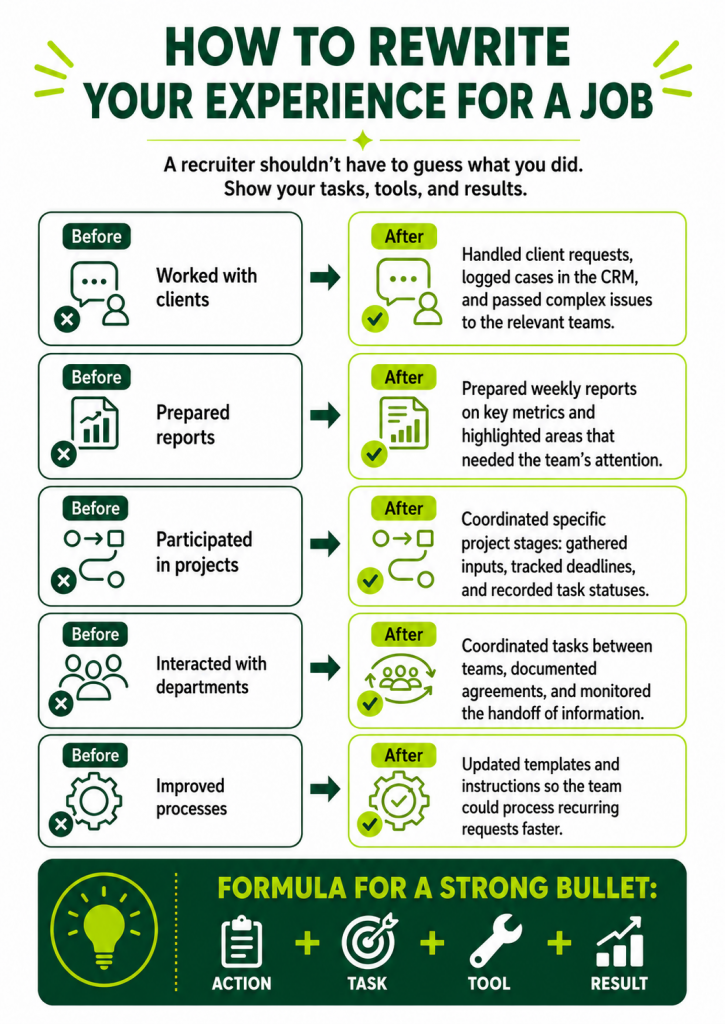
Before:
“Worked with clients and helped solve issues.”
After:
“Processed client requests, recorded cases in CRM, and coordinated issue resolution with internal teams.”
Before:
“Made reports for the manager.”
After:
“Prepared weekly reports on key indicators, tracked task dynamics, and helped the manager make decisions on priorities.”
Before:
“I worked on content.”
After:
“Planned and prepared content for digital channels, adapted materials for the target audience, tracked engagement, and adjusted topics based on results.”
Before:
“Participated in projects.”
After:
“Coordinated individual project stages: collected input, assigned tasks, monitored deadlines, and recorded completion statuses.”
Notice that a good statement includes an action, an object, and a result or context.
Not just “handled reports,” but “prepared reports on performance indicators.”
Not just “worked with the team,” but “coordinated tasks between the team and contractors.”
Not just “improved processes,” but “reduced request processing time by updating response templates.”
Metrics make a CV more credible. If you have numbers, use them:
- increased;
- reduced;
- accelerated;
- processed;
- launched;
- prepared;
- trained;
- decreased;
- optimised.
But the numbers must be honest. If you are not sure, do not write “increased efficiency by 73%” just because 73% sounds impressive. You may be asked in the interview how you calculated it. And if the answer is “well, roughly,” it will not be the best moment.
If you do not have exact numbers, use careful wording:
- “reduced the number of repeated client questions by updating instructions”;
- “sped up weekly reporting by introducing a unified template”;
- “helped structure the task handover process between departments”;
- “improved visibility of project statuses for the team and manager.”
25–30 Minutes: Check Skills, Format, and Final Details
The last five minutes are for the final check. This is where many candidates ruin an otherwise good application.
Check the key skills. They should not just be nice words. They should be skills connected to the vacancy.
If the vacancy requires CRM, reporting, communication, Excel, and task management, but your skills section says “responsibility, punctuality, quick learner, confident PC user,” your CV looks weaker than it could.
It is better to divide skills into clear groups:
- professional skills;
- tools;
- communication skills;
- analytics;
- task management.
For example:
- CRM systems;
- working with client requests;
- report preparation;
- performance analysis;
- written communication;
- task coordination;
- working with spreadsheets;
- documentation management;
- task prioritisation.
Check the CV format. For ATS, it is better to use a simple, readable document:
- no complex tables;
- no images instead of text;
- no decorative skill scales;
- no important information in headers or footers;
- clear section headings;
- standard job titles;
- PDF or DOCX format, unless the employer requests something else.
Check the file name. It is better not to send “new CV final 2.”
A normal option:
- Firstname_Lastname_Position.pdf
For example:
- Alina_Koval_Project_Manager.pdf
Finally, quickly reread the first 30 seconds of your CV. That is often how it is viewed during initial screening. If it is clear within that time who you are and why you fit, the tailoring worked.
Which CV Sections Should Be Changed for a Specific Job
Not every part of the CV needs to be adapted equally. Some sections matter more because the recruiter sees them first. Some help you pass ATS. Some increase credibility. Let’s go through them one by one.
CV Headline
The headline is not just a job title. It is the first match between your CV and the vacancy.
If you are applying for a “Customer Support Specialist” role, and your CV says “Operator / Manager / Specialist,” the match is weak.
It is better to use a title close to the vacancy, if it honestly reflects your experience.
For example:
- Customer Support Specialist;
- Project Coordinator;
- Marketing Manager;
- HR Specialist;
- UX/UI Designer;
- Sales Manager;
- Office Manager.
If your experience is adjacent, you can make the headline broader, but still relevant:
- “Client Support and Customer Success Specialist”;
- “Project and Operations Coordinator”;
- “Marketer with Content and Analytics Experience.”
Avoid being overly creative: “the person who turns chaos into order.” It sounds cute for a blog, but not great for ATS. Save creativity for the cover letter or portfolio, if appropriate.
“About Me” Section
The “About Me” section should almost always be adapted. It is the fastest way to show your fit for the vacancy.
For one vacancy, you can emphasise analytics. For another, communication. For a third, task management.
The main thing is not to turn this section into a list of generic qualities. The employer needs to see professional focus.
A good structure:
- professional role;
- relevant experience;
- key skills;
- types of tasks you can handle.
Example:
“Specialist with experience coordinating tasks, managing reporting, and communicating with clients. Worked with CRM, spreadsheets, and internal systems; helped the team monitor deadlines and maintain process transparency.”
This text works much better than “active and goal-oriented.”
Key Skills
Key skills in a CV tailored to a vacancy should match the employer’s requirements, but not copy them blindly.
If the vacancy includes:
- project management;
- working with contractors;
- performance analytics;
- preparing presentations;
- working in CRM,
then these skills should appear in your CV, if you have them.
You do not need to add 40 skills. When there is too much of everything, the important things get lost. The recruiter sees a pile of words, not a professional profile.
It is better to have 10–15 precise skills than a huge display case of “a jack of all trades and also a bit of a targeting specialist.”
Work Experience
Work experience is the main section for tailoring. Here, it is important to show not only what you did, but how similar it is to the tasks in the vacancy.
If the vacancy is about independently managing tasks, add wording about independence, deadlines, priorities, and responsibility for results.
If the vacancy is about working with clients, show communication, request processing, problem solving, and service quality.
If the vacancy is about analytics, add reports, metrics, insights, and data-based decisions.
If the vacancy is about management, show coordination, task distribution, status control, and interaction with teams.
It is important not just to insert keywords from the vacancy, but to support them with examples.
Achievements
Achievements in CVs often look modest or are missing entirely. Many candidates think: “What achievements do I have? I just worked.”
But an achievement does not have to mean winning employee of the year and getting a photo on the corporate wall of fame.
An achievement is a useful result of your work.
For example:
- you sped up a process;
- made work clearer;
- reduced the number of errors;
- improved communication;
- helped meet a target;
- launched a new format;
- structured chaos;
- trained colleagues;
- prepared a knowledge base;
- improved task processing quality.
When tailoring your CV to a vacancy, choose the achievements closest to the employer’s tasks.
For an analytics-focused vacancy, it is better to show reporting and metrics. For a client-focused vacancy, service quality and request processing speed. For a process-focused vacancy, optimisation and structure.
Education, Courses, and Certificates
This section does not always need to be changed, but sometimes it can strengthen the CV.
If you have courses related to the vacancy, move them higher or leave only the relevant ones.
For example, if you are applying for an analytics role, a course in Excel, SQL, Google Analytics, or Power BI will be more useful than an old certificate in “business correspondence basics,” if it is not related to the role.
If you lack experience, relevant training can partly close the gap. But do not overload the CV with every webinar you have ever watched at 1.5x speed.
Cover Letter
A cover letter is not always required, but for a quick application, it can be an extra advantage.
The main thing is not to write a letter like:
“Hello. I am interested in your vacancy. Please consider my application. Best regards.”
That is so neutral it is almost invisible.
It is better to briefly show the match:
“Hello. I am applying for this vacancy because my experience closely matches your tasks: I have worked with client requests, managed CRM records, prepared reports, and coordinated tasks with internal teams. I have described the relevant experience in more detail in my CV.”
This letter is not trying to be a novel. It simply helps the recruiter see the connection between the vacancy and your experience faster.
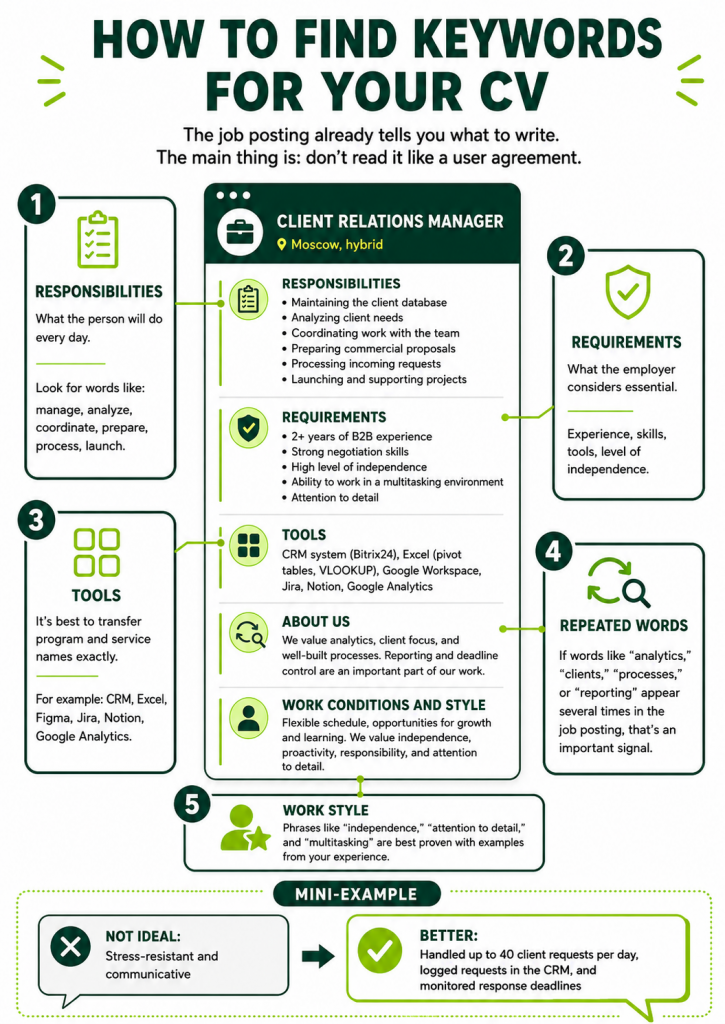
How to Find Keywords in a Job Description
Keywords from a vacancy are words and phrases the employer uses to describe the candidate they need. They matter both for ATS and for recruiters.
To choose keywords for your CV, carefully look at several areas of the vacancy.
The first area is responsibilities. This is where the employer describes what the person will do every day.
For example:
- “communicate with clients”;
- “prepare reports”;
- “analyse performance indicators”;
- “coordinate tasks”;
- “create content”;
- “work with contractors”;
- “process incoming requests.”
The second area is requirements. This is where the skills and experience needed to pass selection are usually listed.
For example:
- “experience with CRM”;
- “strong Excel skills”;
- “knowledge of Figma”;
- “understanding of digital marketing”;
- “project management experience”;
- “strong written communication.”
The third area is tools. These should be transferred into your CV accurately, if you have used them.
For example:
- Excel;
- Google Sheets;
- Jira;
- Trello;
- Notion;
- Figma;
- Canva;
- Google Analytics;
- CRM;
- Slack;
- Miro;
- PowerPoint.
The fourth area is repeated words. If the vacancy mentions “processes,” “analytics,” “communication,” or “independence” several times, that is a signal.
The fifth area is wording about work style. Sometimes the employer is looking not only for a skill, but also for an approach:
- “ability to work in a multitasking environment”;
- “attention to detail”;
- “structured approach”;
- “ability to make independent decisions”;
- “ability to negotiate with different stakeholders.”
You do not need to copy such phrases completely, but you can show them through experience.
For example, instead of “I can multitask,” it is better to write:
“Managed up to 15 client requests simultaneously, recorded statuses in CRM, and monitored response deadlines.”
That is no longer just a quality. It is proof.
How to Use Keywords Without Stuffing
Keyword stuffing makes a CV look strange. Sometimes it starts to sound as if it was written by a robot that really wanted to impress another robot.
Bad example:
“I have experience working with CRM. Worked with CRM tasks, CRM processes, CRM clients, CRM communication, and CRM reports.”
Do not do this.
Keywords should be integrated naturally. It is best to use them in three places:
- the “About Me” section;
- key skills;
- work experience descriptions.
For example, if the keyword is “CRM,” it can be used like this:
In the “About Me” section:
“Worked with client requests, CRM, and regular reporting.”
In skills:
“CRM systems, client database management, request logging.”
In experience:
“Recorded client requests in CRM, tracked task statuses, and passed information to responsible teams.”
That is enough. You do not need to put the same word in every line.
It is also important to use synonyms. If the vacancy says “performance analytics,” you can write:
- metric analysis;
- reporting;
- working with data;
- performance evaluation;
- preparing insights;
- KPI monitoring.
But exact tool names should not be replaced. If the employer is looking for Figma, write Figma. If Jira, write Jira. If Excel, write Excel, not “spreadsheet editor,” as if you are afraid to say its name.
How to Tailor Experience If It Does Not Match the Vacancy 100%
This is a very common situation: the vacancy is interesting, some requirements fit, but there is no full match.
And many candidates make one of two mistakes.
The first is not applying at all because “I am not the perfect candidate.”
The second is trying to stretch the experience so much that it starts to fall apart.
The right approach is to show transferable skills and honestly strengthen the relevant parts of your experience.
Transferable skills are skills that can be used in different roles:
- communication;
- analytics;
- task coordination;
- working with clients;
- documentation;
- report preparation;
- structuring information;
- time management;
- working with tools;
- problem solving.
For example, you want to move from support into project coordination. You may not have official “project coordinator” experience, but you may have experience processing requests, interacting with teams, monitoring statuses, working with CRM, and documenting tasks. That is already close.
Do not write:
“Managed projects,” if you did not manage projects.
You can write:
“Coordinated the resolution of client requests between support, the technical team, and managers; recorded task statuses and monitored response deadlines.”
This is honest and relevant.
If you want to move from an administrative role into HR, you can show:
- working with documents;
- communication with people;
- coordinating meetings;
- managing spreadsheets;
- attention to data;
- participating in employee onboarding;
- organising processes.
If moving from design into marketing, show:
- understanding of the audience;
- work with visual materials;
- analysing response;
- participation in campaigns;
- adapting creatives for channels.
If moving from sales into account management, show:
- client management;
- negotiations;
- handling objections;
- tracking agreements;
- understanding client needs;
- maintaining and developing relationships.
When you do not have exact experience, do not pretend that you do. Show the bridge between what you have done and what the employer needs.
How to Turn Responsibilities Into Achievements
A CV made only of responsibilities often sounds flat.
- “Responsible for reports.”
- “I worked with clients.”
- “Managed tasks.”
- “Participated in meetings.”
Formally, everything is understandable. But it is not clear how well you did it or what changed because of your work.
To rephrase responsibilities into achievements, ask yourself a few questions:
- What became faster?
- What became clearer?
- What became more stable?
- What problem did I solve?
- What result did the manager, client, or team get?
- What was it like before me, and what changed after?
- What volume of work did I handle?
- What metrics improved?
Example 1.
Responsibility:
“Prepared reports.”
Achievement:
“Set up a unified weekly reporting template, which helped the manager see task statuses and problem areas faster.”
Example 2.
Responsibility:
“Processed client requests.”
Achievement:
“Processed up to 40 client requests per day, recorded cases in CRM, and helped reduce repeated follow-up questions through clear response templates.”
Example 3.
Responsibility:
“Managed social media.”
Achievement:
“Prepared a content plan and regular content categories, which helped make posting consistent and increase audience engagement.”
Example 4.
Responsibility:
“Worked with contractors.”
Achievement:
“Coordinated contractor work, monitored task deadlines, and reduced the risk of delays through regular status tracking.”
Example 5.
Responsibility:
“Helped the team.”
Achievement:
“Collected input from different team members, structured tasks, and helped transfer information between departments faster.”
An achievement does not always have to be loud. It has to show value.
Examples of Tailored CV Wording
Now let’s look at “before/after” examples. This is one of the fastest ways to understand how to rewrite experience in a CV for a specific vacancy.
Example 1: The Vacancy Requires Client Work and CRM
Before:
“Communicated with clients, solved issues, worked in the system.”
After:
“Processed client requests, recorded cases in CRM, tracked resolution statuses, and passed tasks to responsible teams.”
Why it is better:
The second version has specifics: requests, CRM, statuses, task handover. It is closer to the language of the vacancy.
Example 2: The Vacancy Requires Analytics and Reporting
Before:
“Made reports and analysed data.”
After:
“Prepared regular reports on key indicators, analysed result dynamics, and identified areas requiring the team’s attention.”
Why it is better:
There is meaning: what reports, why the analysis was done, and what happened after the analysis.
Example 3: The Vacancy Requires Task Management
Before:
“Monitored project tasks.”
After:
“Coordinated project tasks, recorded deadlines, tracked completion statuses, and reminded participants about priorities.”
Why it is better:
The phrase shows specific actions, not an abstract “monitored.”
Example 4: The Vacancy Requires Independence
Before:
“Completed tasks assigned by the manager.”
After:
“Independently handled operational tasks: collected input, clarified deadlines, prepared materials, and submitted the result to the manager for approval.”
Why it is better:
The candidate looks not just like an executor, but like someone who can take a task and bring it to completion.
Example 5: The Vacancy Requires Communication With Different Teams
Before:
“Interacted with departments.”
After:
“Coordinated tasks between marketing, sales, and support, documented agreements, and monitored information transfer between teams.”
Why it is better:
It is clear who the candidate interacted with and why.
Example 6: The Vacancy Requires Process Improvement
Before:
“Improved work processes.”
After:
“Updated response templates and team instructions, which helped process recurring requests faster and reduce the number of clarifications.”
Why it is better:
There is an action, a result, and value.
Example 7: The Vacancy Requires Content Work
Before:
“Wrote texts for the website and social media.”
After:
“Prepared texts for the website and social media, adapted materials for different channels, and considered audience needs at each stage of communication.”
Why it is better:
It shows not only “wrote,” but also “why” and “how.”
Example 8: The Vacancy Requires Attention to Detail
Before:
“Checked documents.”
After:
“Checked documents before sending them to clients, verifying data, wording accuracy, and the presence of required information.”
Why it is better:
Attention to detail is shown through action, not simply stated.
How to Tailor a CV for ATS
ATS is a system that helps employers store, sort, and filter CVs. It does not always make the decision, but it can affect how easily your CV is found and read.
A CV for ATS should be simple, clear, and text-based. The more complex the design, the higher the risk that the system will misread the information.
To make your CV readable for ATS, follow a few rules.
Use standard headings:
- Work Experience;
- Education;
- Skills;
- About Me;
- Courses and Certificates;
- Contacts.
Do not name sections too creatively. For example, “My Professional Journey” sounds nice, but ATS may understand it worse than the standard “Work Experience.”
Do not place important information only in images, icons, or charts. If you create a beautiful scale saying “Excel — 90%,” the system may not read it as a skill. And a real recruiter may wonder: “What does 90% Excel mean? Are the remaining 10% pivot tables in the dark?”
Better to write specifically:
Excel: pivot tables, filters, formulas, reports.
Use keywords from the vacancy, but naturally. If the vacancy names a tool, add it to skills and experience if you have really worked with it.
Do not overload your CV with tables. Some ATS systems process complex layouts poorly. It is better to use a simple structure with clear sections.
Check the file. A safe option is often PDF, unless the employer asks for DOCX. But if the application form requires a specific format, follow the requirements.
Do not hide contacts in headers or footers. Sometimes systems read them incorrectly. It is better to place contacts at the top of the document as normal text.
And most importantly: ATS is not the enemy. Do not try to “trick” it with white text, hidden keywords, and other tricks from the “how to ruin your reputation in two minutes” category. Your task is to make the CV clear for both automated screening and a human being.
What Not to Do When Tailoring a CV
CV tailoring helps when it is honest and precise. But there are mistakes that can hurt you.
Mistake 1: Copying the Vacancy Word for Word
Sometimes a candidate takes the responsibilities from the vacancy and inserts them into the CV almost unchanged.
It looks suspicious. The recruiter sees that the CV text suddenly matches the vacancy perfectly, but without proof or detail.
It is better to use the language of the vacancy, but support it with your own experience.
Mistake 2: Adding Skills You Do Not Have
If you listed SQL but cannot explain what SELECT is in the interview, it will be awkward.
If you wrote “confident Figma user,” but opened it once just to look at a designer’s layout, that is also risky.
You can write “basic understanding,” “entry-level experience,” or “worked at the level of viewing and commenting,” if that is true. Honest accuracy is better than attractive exaggeration.
Mistake 3: Making the CV Too Long
Tailoring should not turn your CV into an encyclopaedia of your working life.
If you have up to 5–7 years of experience, 1–2 pages are often enough. If you have more experience, 2–3 pages may be appropriate, but the focus still matters.
A recruiter does not need to know every task from every position if it does not help the current application.
Mistake 4: Leaving Irrelevant Experience Without Explanation
If part of your experience is not connected to the vacancy, you do not necessarily need to remove it completely. But you can shorten the description and leave only transferable skills.
For example, if you are moving from sales into HR, you do not need to describe every sales target in detail. It is better to show communication, client interviews, objection handling, database management, and needs assessment.
Mistake 5: Forgetting About the Job Title
Sometimes the CV is good, but the headline does not match the vacancy. The candidate applies for a project manager role, but the CV says “specialist.” Or applies for a marketing role, but the headline still says “content manager,” even though the experience is broader.
The headline should be adapted if it honestly reflects your role and career goal.
Mistake 6: Writing Too Generally
- “Worked with tasks.”
- “Participated in processes.”
- “Interacted with people.”
- “Solved issues.”
These are foggy phrases. Something seems to be there, but nothing is visible.
It is better to add specifics:
- what tasks;
- with which people;
- what processes;
- what issues;
- what tools;
- what result.
Mistake 7: Adapting Only Skills, Not Experience
If the skills section says “analytics,” but the experience section has not a single example of analysis, trust becomes weaker.
A key skill should be supported by experience. Otherwise, it looks like a sticker on an empty box.
Quick Checklist Before Sending Your CV
Before you send your application, check the CV using this short checklist.
- Is it clear from the headline which role you are applying for?
- Does the “About Me” section match this specific vacancy?
- Are there keywords from the vacancy in the CV?
- Are relevant hard skills listed?
- Are the skills supported by examples in work experience?
- Are there 2–4 achievements or results?
- Have unnecessary details that do not help this application been removed?
- Is it clear what tasks you performed?
- Is there specificity instead of general phrases?
- Have you avoided adding skills you do not have?
- Can the CV be understood in 30–60 seconds?
- Is the format suitable for ATS?
- Are there any errors, strange line breaks, or outdated details?
- Is the file named properly?
- Is there a cover letter, if appropriate?
This quick CV checklist before applying helps avoid typical mistakes. Sometimes one corrected headline, one solid “About Me” section, and several precise experience statements already noticeably improve the application.
When You Need Separate CV Versions
Changing a couple of lines is not always enough. Sometimes you need separate CV versions.
This is especially relevant if you are considering different areas.
For example:
- project management and client service;
- marketing and content;
- HR and administrative roles;
- design and communication;
- sales and account management;
- technical support and customer success.
In these cases, it is better to create 2–3 base CV versions for different types of roles.
For example:
- CV for project coordinator roles;
- CV for customer support roles;
- CV for marketing specialist roles.
Then you can slightly tailor each version to a specific vacancy.
This is faster than reworking one universal document every time.
A separate version is needed if:
- the vacancies require different skills;
- different employers will look at different parts of your experience;
- the desired job title changes;
- the “About Me” section needs to be very different;
- the same experience needs to be presented from different angles.
But you do not need 25 versions where the only difference is one word. That quickly turns into chaos. It is better to have several strong base CVs and adapt them in a targeted way.
Can You Use AI to Tailor a CV?
You can use AI to tailor your CV, but you should not hand over full control.
A good way is to use AI as an assistant:
- compare your CV with the vacancy;
- identify keywords;
- suggest improved wording;
- help turn responsibilities into achievements;
- make the text clearer;
- find unnecessary generic phrases;
- prepare a draft cover letter.
But the final decision should be yours. Why? Because AI has not lived your experience. It can beautifully phrase something that never happened. And your task is not to get perfect text at any cost, but to make the CV accurate and truthful.
You can use a prompt like this:
“Analyse the job description and my CV. Identify the employer’s key requirements, show which parts of my experience match them, and suggest which wording can be improved. Do not add experience that is not there.”
Or this:
“Help me rewrite responsibilities into achievements for my CV. Keep the facts, do not exaggerate, and make the wording more specific and relevant to the vacancy.”
AI is useful when you need to quickly bring order to the text. But it should not turn your CV into a glossy legend about a person who increased everything, optimised everyone, and implemented strategic synergy into the office coffee machine in three months.
How a Recruiter Reads a Tailored CV
To better understand why tailoring matters, it is useful to look at the CV through a recruiter’s eyes.
During the initial review, a recruiter does not read the document like a book. They scan it.
First, they look at:
- job title;
- most recent experience;
- key skills;
- “About Me” section;
- match with requirements;
- stability of experience;
- clarity of wording;
- results.
If matches are visible immediately, the CV moves forward faster.
If the experience is good but hidden behind general words, the recruiter may simply not have time to notice it. Especially if there are many applications for the vacancy.
Imagine a recruiter has 80 CVs open. They are looking for candidates with experience in client support, CRM, and reporting. One CV says:
“Communicative, responsible, worked with different tasks.”
Another says:
“Processed client requests, recorded cases in CRM, prepared weekly reports on requests, and passed complex cases to specialised teams.”
The second CV wins not necessarily because the candidate is better. It wins because the experience is easier to recognise.
Tailoring a CV is respect for the recruiter’s attention. You do not force the person to search for meaning between the lines. You show the main thing immediately.
How to Tailor a CV to Employer Requirements Without Losing Individuality
Some people worry that tailoring a CV will make the document too “custom-made for the employer” and remove personality. In reality, good tailoring does not erase individuality. It removes noise.
Your professional style can be shown through:
- choice of achievements;
- precision of wording;
- structure of experience;
- strengths;
- approach to work;
- cover letter;
- portfolio, if you have one.
For example, three candidates may all work with projects. One emphasises analytics and structure. Another emphasises communication and working with people. A third emphasises speed and process launches. All three can tailor their CVs to the same vacancy, but the presentation will be different.
It is important not to turn the CV into a faceless list of vacancy requirements. You do not need to write only what the employer wants. You need to show your real strengths through the lens of their task.
The employer is not looking for a human-shaped copy of the vacancy. They are looking for someone who can solve the problem.
Mini Template for Tailoring a CV in 30 Minutes
You can use this template every time before applying.
Step 1. Write Down the Main Goal of the Vacancy
Answer in one sentence:
“The employer is looking for someone who will…”
For example:
“The employer is looking for someone who will process client requests, manage CRM, and maintain high-quality communication.”
Or:
“The employer is looking for someone who will coordinate tasks, monitor deadlines, and prepare reports.”
Step 2. Identify the 5 Main Requirements
For example:
- CRM;
- client communication;
- reporting;
- multitasking;
- strong written communication.
Step 3. Find Proof in Your Experience
Next to each requirement, write where you have done this.
CRM — worked in a request management system.
Communication — replied to clients via chat and email.
Reporting — prepared weekly reports.
Multitasking — handled several requests simultaneously.
Written communication — wrote instructions and response templates.
Step 4. Update the “About Me” Section
Make it fit the specific role.
Step 5. Rewrite 3–6 Experience Points
Use the language of the vacancy, but keep your facts.
Step 6. Update Skills
Add relevant key skills and tools.
Step 7. Check ATS and Readability
Simple structure, clear headings, proper file name.
This algorithm helps you avoid getting stuck. You are not “improving your CV in general.” You are preparing a CV for a specific application.
Frequently Asked Questions
Do I Need to Tailor My CV for Every Job?
Yes, if the vacancy is genuinely interesting to you. You do not have to rewrite the whole CV every time, but key sections should be adjusted: headline, “About Me,” skills, experience, and achievements.
If you apply in bulk without tailoring, some applications may simply fail the initial filter. Especially if the CV is too general.
How Long Should CV Tailoring Take?
If the base CV is already ready, tailoring a CV in 30 minutes is realistic.
The first few times may take longer because you are still learning to identify what matters. Later, the process becomes faster.
A good goal is not a perfect CV for all time, but a sufficiently precise CV for a specific vacancy.
What Should I Change First Before Applying?
First, change the most visible and important sections:
- headline;
- “About Me” section;
- key skills;
- description of the most recent or most relevant experience;
- achievements;
- cover letter.
These elements help show fit with the vacancy the fastest.
How Do I Know Which Skills to Include in My CV?
Compare the job requirements with your real experience. Include skills that are:
- in the vacancy;
- genuinely yours;
- supported by experience;
- important for the role.
Do not add everything. Less but more precise is better.
Can I Use Keywords From the Vacancy Directly in My CV?
Yes, if they match your experience. In fact, this is useful for ATS and recruiters. But keywords should be integrated naturally.
Do not copy the vacancy requirements word for word. Show them through your own tasks and results.
How Do I Tailor My CV If I Do Not Have Exact Experience?
Look for transferable skills. For example: communication, analytics, task coordination, working with clients, reporting, documentation, deadline management.
Do not claim experience you do not have. It is better to show related experience and explain why it is relevant.
Why Do I Get No Responses If My Experience Fits?
There can be many reasons: high competition, applying too late, poor CV format, weak headline, lack of keywords, too general a description of experience, or an internal candidate.
Sometimes the experience really does fit, but it is not visible in the CV. That is why it is important not only to have relevant experience, but to present it properly.
Do I Need a Separate CV for ATS?
You do not necessarily need a separate ATS CV, but your main document should be readable for ATS. Use a simple structure, standard headings, text format, keywords, and clear tool names.
Attractive design should not interfere with information recognition.
Can I Send the Same CV to Similar Vacancies?
Yes, if the vacancies are truly similar. But even then, it is better to do a quick check before sending: do the keywords, tasks, tools, and emphasis match?
Sometimes two vacancies with the same title actually require different experience.
How Many Keywords Should Be in a CV?
There is no universal number. Relevance matters more than quantity. Usually, it is enough to use the main keywords in the “About Me” section, skills, and experience.
If the CV reads naturally and accurately reflects your experience, it is fine. If it looks like a list of words from the vacancy, you have overdone it.
Do I Need to Write a Cover Letter for Every Application?
If the vacancy is interesting, a short cover letter can help. Especially if you want to explain a career transition, highlight relevant experience, or quickly show motivation.
The letter should not be long. Five to seven sentences are enough.
What Should I Do If I Still Get No Responses After Tailoring My CV?
Check several things:
- whether the vacancies match your level;
- whether you apply quickly enough;
- whether your CV has enough specifics;
- whether your professional focus is clear;
- whether there are achievements;
- whether there are too many generic phrases;
- whether the document is formatted correctly;
- whether your salary expectations match the market;
- whether there is a cover letter for complex cases.
Sometimes the problem is not one CV, but the job search strategy. Still, tailoring your CV remains one of the fastest ways to improve the quality of your applications.
Final Algorithm: How to Tailor Your CV to a Specific Job in 30 Minutes
To quickly tailor your CV to a vacancy, follow a simple structure.
First, carefully review the job description. Identify the main tasks, employer requirements, tools, and repeated wording.
Then choose the keywords from the vacancy: skills, software, processes, work methods, and task types. Do not insert them mechanically. Use them where they are supported by your experience.
After that, compare the vacancy with your CV. Find matches and weak spots. The required experience may already be there, but currently described too generally.
Next, update the “About Me” section. In 3–5 lines, show who you are, what relevant experience you have, and what tasks you can handle.
Then adapt your work experience. Rewrite several points so they are closer to the vacancy. Add actions, tools, results, and metrics if you have them.
Then check your key skills. Remove what is unnecessary, add what matters, and use exact names of tools and skills.
The final step is checking ATS readability, structure, errors, and file name.
Tailoring your CV to a specific job is not about trying to please everyone. It is a way to show the employer: “I read your vacancy carefully, understood the task, and can be useful here.”
And yes, 30 minutes can really be enough. The key is not to reinvent your CV every time, but to follow a clear process.